


If there’s one thing that permeates the entire carding industry, it’s the existence of NON-VBV bins. You see it everywhere – on forums, in Telegram channels, on Discord servers, on darknet markets – it’s NON-VBV. But even though it’s the most talked about topic in carding circles, misinformation still spreads like herpes. We’ll clear up the confusion with this article.
3DS 2.0
3D Secure 2.0 is an improved form of the original “Verified by Visa” and “Mastercard SecureCode” nonsense that used to give you those annoying password pages during checkout. The previous version, 3DS 1.0, was a clunky piece of junk that relied on static passwords or security questions.
3DS 2.0 was a complete game changer. Instead of simply asking for a password, this new system collects more than 100 data points about your transaction—device fingerprint, geolocation purchase history, browsing patterns—and runs them through risk-scoring algorithms to determine whether you're legitimate or not.

The crown jewel of this system is what they call “frictionless authentication.” When a card issuer receives a 3DS 2.0 authentication request, they analyze all of those data points in real time. If everything looks good, they’ll approve the transaction without bothering the cardholder to verify. No SMS code, no app notification, nothing — the payment just goes through.
That’s why your standard carding methods from 2018 are now as useful as a dick-flavored lollipop. The game has moved from bypassing passwords to manipulating risk assessment systems or finding cards that bypass the entire process entirely.
NON-VBV BINs
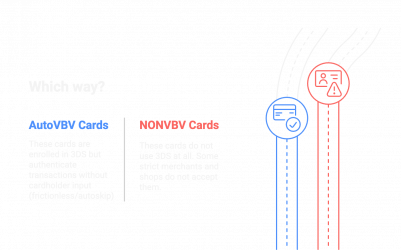
NONVBV bins are the bread and butter of the carding world. They’re not special cards — they’re just regular credit cards from issuers that either screwed up their 3DS implementation or don’t use the protocol at all.
There are two main types that fall into this category:
Auto-VBV Cards
Auto-VBV cards are technically 3DS-enabled, but they have a critical flaw: they automatically authenticate the transaction without requiring input from the cardholder. The issuing bank has implemented 3DS, but their system is set up to allow transactions through the “no-hassle” route almost 100% of the time.
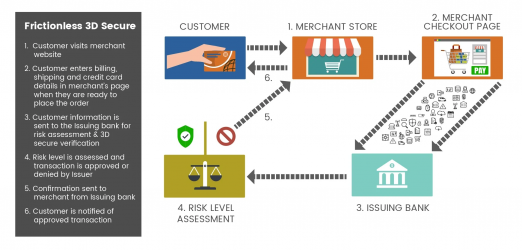
When you use them for transactions, the merchant's system thinks the card has passed the proper 3DS check. In reality, the bank's access control server has simply stamped it without any real security check.
NON-VBV Cards
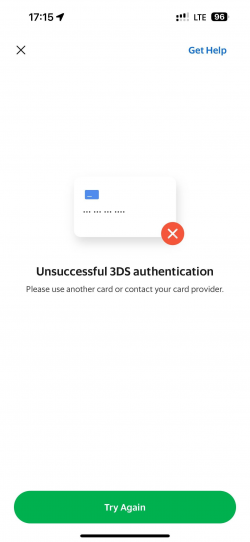
Real NON-VBV cards are issued by banks that do not participate in 3DS at all. These dinosaurs have not implemented the security protocol, so when the merchant tries to initiate 3DS verification, the transaction simply proceeds with the basic card data (number expiration date, CVV). Some strict merchants do not support them at all.
How to Use Bins
While both types allow you to bypass authentication issues, Auto-VBV cards have distinct advantages:
Checkers
Finding NON-VBV bins isn’t as easy as browsing the web. Banks are constantly updating their security protocols, and bins that worked last month may be completely secure today. That’s where checkers come in.
You have two options for checking NON-VBV bins:
Checkers via merchant APIs.
Advanced carders create their own checkers using merchant APIs. These tools generate test cards from a specific range of bins and attempt to process transactions through payment gateways that implement 3DS. By analyzing the authentication response, they can determine whether the bin is causing 3DS issues or not.
Setting up your own checker requires technical knowledge and access to the payment processing API — I’ll cover that in a future guide. The benefit is that you get reliable, real-time data without relying on third parties.
Checkers in Telegram.
For beginners, Telegram checkers like SAB and Raven are more accessible. These services allow you to enter a bin and they will run a quick test to see if cards in that range are capable of beating the 3DS.

Here's how these inspectors typically work:

But these services come with a huge caveat: they test a single bin of the card. Some issuers define 3DS requirements on a card-by-card basis, rather than on a specific bin. Just because one bin of a card authenticates flawlessly does not guarantee that all cards with the same bin will behave the same.
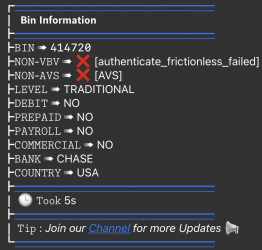
Another problem is that banks often use dynamic risk assessment. A card may skip 3DS for small purchases, but require verification for larger amounts or suspicious transactions. Checkers usually verify with minimal transactions, so they can mark a bin as NON-VBV, when in fact it will trigger 3DS for your real carding attempts.
Conclusion
NON-VBV bins are dying out fast. Banks around the world are implementing 3DS 2.0 with intelligent risk detection, which makes it harder to find workarounds every day.
Professionals no longer waste time hunting for good bins - they are moving to social engineering, OTP bots and other methods that do not rely on magic card numbers. Found a working NON-VBV bin? Great, but don't get attached - this crap can be fixed tomorrow.
As I always said, it's not about the bins at all. Focus on your device fingerprint first. Make sure your anti-detection setup is solid, your proxies are clean, and your browser profile isn't leaking. The best bean in the world won't save you if your device fingerprint is dirty.
Security is evolving, and you better evolve with it. Keep learning, stay flexible, and don't get caught in yesterday's schemes.
(c) Contact the author here: d0ctrine
3DS 2.0
3D Secure 2.0 is an improved form of the original “Verified by Visa” and “Mastercard SecureCode” nonsense that used to give you those annoying password pages during checkout. The previous version, 3DS 1.0, was a clunky piece of junk that relied on static passwords or security questions.
3DS 2.0 was a complete game changer. Instead of simply asking for a password, this new system collects more than 100 data points about your transaction—device fingerprint, geolocation purchase history, browsing patterns—and runs them through risk-scoring algorithms to determine whether you're legitimate or not.
The crown jewel of this system is what they call “frictionless authentication.” When a card issuer receives a 3DS 2.0 authentication request, they analyze all of those data points in real time. If everything looks good, they’ll approve the transaction without bothering the cardholder to verify. No SMS code, no app notification, nothing — the payment just goes through.
That’s why your standard carding methods from 2018 are now as useful as a dick-flavored lollipop. The game has moved from bypassing passwords to manipulating risk assessment systems or finding cards that bypass the entire process entirely.
NON-VBV BINs
NONVBV bins are the bread and butter of the carding world. They’re not special cards — they’re just regular credit cards from issuers that either screwed up their 3DS implementation or don’t use the protocol at all.
There are two main types that fall into this category:
Auto-VBV Cards
Auto-VBV cards are technically 3DS-enabled, but they have a critical flaw: they automatically authenticate the transaction without requiring input from the cardholder. The issuing bank has implemented 3DS, but their system is set up to allow transactions through the “no-hassle” route almost 100% of the time.
When you use them for transactions, the merchant's system thinks the card has passed the proper 3DS check. In reality, the bank's access control server has simply stamped it without any real security check.
NON-VBV Cards
Real NON-VBV cards are issued by banks that do not participate in 3DS at all. These dinosaurs have not implemented the security protocol, so when the merchant tries to initiate 3DS verification, the transaction simply proceeds with the basic card data (number expiration date, CVV). Some strict merchants do not support them at all.
How to Use Bins
While both types allow you to bypass authentication issues, Auto-VBV cards have distinct advantages:
- Liability protection: Transactions that complete 3DS authentication (even automatically) shift liability for fraud from the merchant to the card issuer. This means merchants are more likely to accept these transactions.
- Higher success rate: Many merchants require 3DS for high-value purchases. Auto-VBV cards technically meet this requirement, while pure NON-VBV cards may be rejected with messages like "issuer not involved."
- Clean paper trail: An Auto-VBV transaction appears legitimate in the merchant's records - it shows up as "3DS authentication successful" rather than "3DS attempted/failed", which raises fewer red flags.
- Wider acceptance: Some payment systems automatically reject cards that do not support 3DS in certain regions (especially in Europe under SCA/PSD2). Auto-VBV cards do not fall under this radar.
Checkers
Finding NON-VBV bins isn’t as easy as browsing the web. Banks are constantly updating their security protocols, and bins that worked last month may be completely secure today. That’s where checkers come in.
You have two options for checking NON-VBV bins:
Checkers via merchant APIs.
Advanced carders create their own checkers using merchant APIs. These tools generate test cards from a specific range of bins and attempt to process transactions through payment gateways that implement 3DS. By analyzing the authentication response, they can determine whether the bin is causing 3DS issues or not.
Setting up your own checker requires technical knowledge and access to the payment processing API — I’ll cover that in a future guide. The benefit is that you get reliable, real-time data without relying on third parties.
Checkers in Telegram.
For beginners, Telegram checkers like SAB and Raven are more accessible. These services allow you to enter a bin and they will run a quick test to see if cards in that range are capable of beating the 3DS.
Here's how these inspectors typically work:
- You send a bean
- The service generates a valid card number from this bean.
- He tries to conduct a small test transaction using his own merchant account, which ensures smooth operation.
- Based on the authentication response, it tells you whether the bean is NON-VBV/Auto-VBV
But these services come with a huge caveat: they test a single bin of the card. Some issuers define 3DS requirements on a card-by-card basis, rather than on a specific bin. Just because one bin of a card authenticates flawlessly does not guarantee that all cards with the same bin will behave the same.
Another problem is that banks often use dynamic risk assessment. A card may skip 3DS for small purchases, but require verification for larger amounts or suspicious transactions. Checkers usually verify with minimal transactions, so they can mark a bin as NON-VBV, when in fact it will trigger 3DS for your real carding attempts.
Conclusion
NON-VBV bins are dying out fast. Banks around the world are implementing 3DS 2.0 with intelligent risk detection, which makes it harder to find workarounds every day.
Professionals no longer waste time hunting for good bins - they are moving to social engineering, OTP bots and other methods that do not rely on magic card numbers. Found a working NON-VBV bin? Great, but don't get attached - this crap can be fixed tomorrow.
As I always said, it's not about the bins at all. Focus on your device fingerprint first. Make sure your anti-detection setup is solid, your proxies are clean, and your browser profile isn't leaking. The best bean in the world won't save you if your device fingerprint is dirty.
Security is evolving, and you better evolve with it. Keep learning, stay flexible, and don't get caught in yesterday's schemes.
(c) Contact the author here: d0ctrine