

Remember our deep dive into anti-detection browsers? Well, grab your digital paintbrushes, because we're about to get our hands dirty fingerprinting the canvas - the Mona Lisa of browser identification methods.

The Art of Digital Identification
Canvas fingerprinting isn't just another hurdle, it's the digital equivalent of leaving fingerprints at a crime scene. While you're busy spoofing IP addresses and user agents, the sneaky bastard is ratting you out to every fraud detection system from here to Silicon Valley.
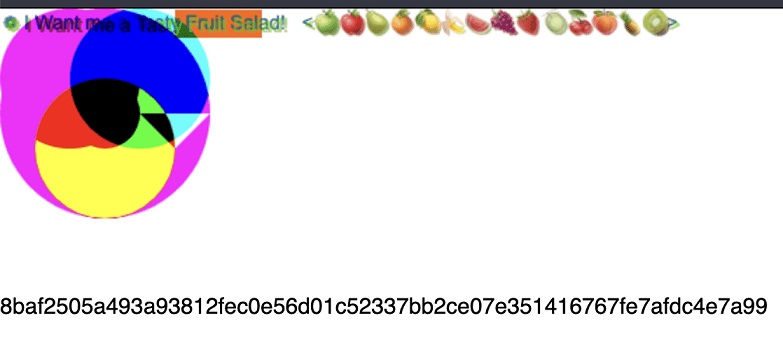
Think of it as your device’s artistic signature. Every brushstroke, every pixel, and every tiny imperfection in the rendering tells a story about your hardware. And like a seasoned art historian, tracking systems can tell the difference between a genuine Rembrandt and a clever forgery: Every time you load a page, your browser paints a unique picture. And just like your sloppy handwriting on those fake IDs, it gives you away.
The Canvas Mystery: Hardware-Level Identification
Now it’s all getting good. Your canvas print is like a digital tattoo that follows you across browsers, VPNs, and even some virtual machines. Change your IP? Easy. Change browsers? Easy. Change the way your GPU maps a specific set of instructions? Now you’re in for a world of pain!
But here’s the twist. Change your GPU? It’s like giving your browser a facelift. Suddenly, you’re a new person. But let's be realistic, how often do you change your GPU?
Masters in Action: Advanced Fingerprinting Techniques
The fraud detection systems we talked about earlier are no longer lying around. And with Canvas Fingerprinting, they use:
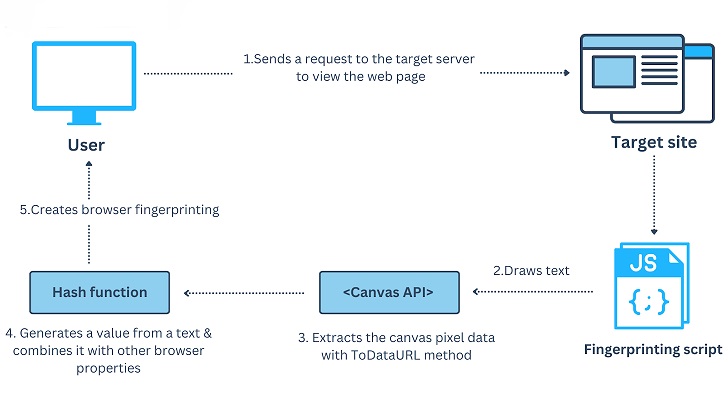
Multi-layer rendering: They create complex multi-layered images by combining text, shapes, gradients, and 3D transforms. Each layer adds another layer of uniqueness.
Accuracy testing: They check the exact pixel values of the rendered images. Even tiny differences in color values or anti-aliasing can be a giveaway.
Performance profiling: It’s not just about the final image, but how long it takes to render. They measure rendering times down to the millisecond, creating a performance profile of your hardware.
WebGL exploitation: They use WebGL to access your GPU. Your canvas fingerprint is a digital tattoo that follows you across browsers, VPNs, and even some virtual machines.
Example code to generate your canvas hash:
Entropy Equation: When Mixing Is Better Than Separation
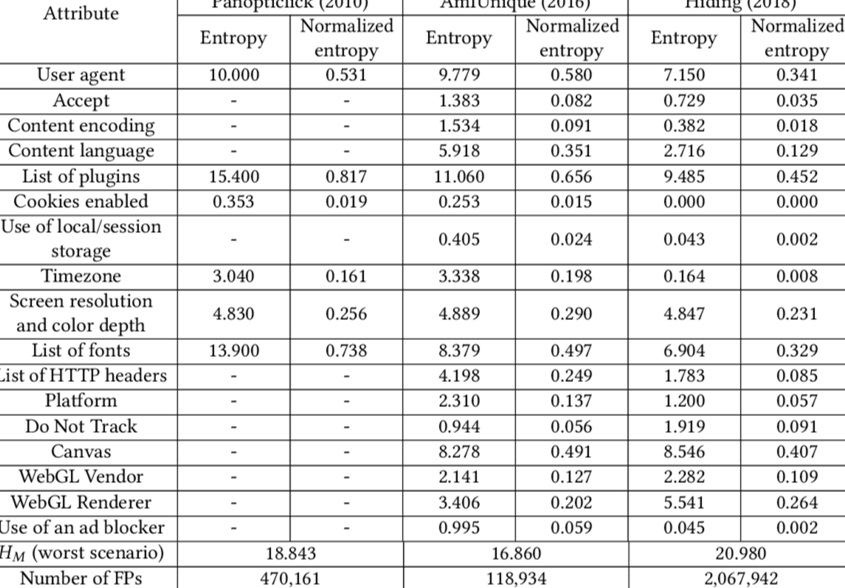
Here’s where it gets interesting. Enter entropy, a measure of how unique your canvas fingerprint is. High entropy means you stand out like a sore thumb. Low entropy? You’re just another face in the digital crowd.
Which brings you to this: Sometimes, not changing your canvas fingerprint might be your best move.
The Great Canvas Myth
For years, the security community has been going crazy about the canvas fingerprint. “It’s unique! It’s trackable! It’s the end of online anonymity!” they screamed. But recent research has dropped a truth bomb: for most modern popular devices, canvas fingerprints are not as unique as we thought. What researchers at Multilogin (overrated anti-detect, lol) actually found:
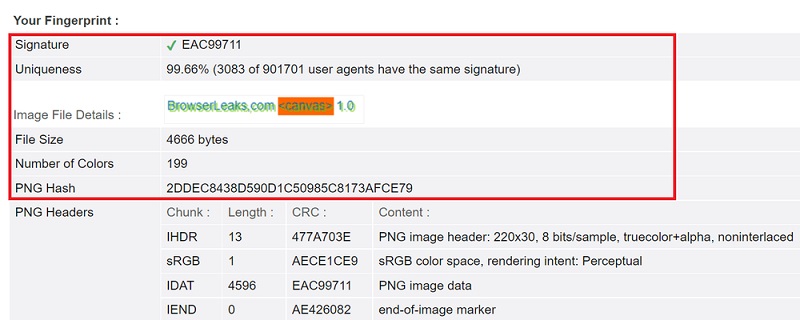
The 2018 Dell XPS had the same canvas fingerprint as a 2012 HP laptop. Every MacBook Pro from 2011 to 2018 had identical fingerprints on Chrome 73.
17 different laptops in a row gave the same canvas signature.
The Power of Boring
So what’s the point? If you’re using a relatively modern, popular device with a popular OS and browser, you might already be blending in. In a world where everyone is trying to be unique, being ordinary is becoming your superpower.
Some browsers are pushing back against canvas fingerprints, each with their own approach:
Brave uses “farbling,” which adds a small amount of randomness to the canvas readings. It’s like giving each canvas a little shot of tequila - just enough to make it wobble, but not enough to make it fall over.
Safari takes a more rigid approach, limiting the amount of information that can be extracted from the canvas elements. It’s like putting the canvas behind frosted glass—you see the overall shape, but the details are blurry.
Of the two, Safari’s approach may be more effective simply because it has a larger user base. When you’re trying to blend in, being part of a larger crowd is always better.
Navigating the Canvas Minefield
So how do you play this canvas game? Here’s your battle plan:
Know your base: Understand what your real device’s canvas fingerprint looks like. This is your “norm.”
Embrace boringness: If you’re using a popular device with a common OS and browser, consider keeping your natural canvas fingerprint. Being ordinary is your camouflage.
Hardware matters: For the best approach, if you can, regularly swap out GPUs to break any correlation with your past orders.
Smart rotation: If you really need to change your fingerprint, rotate through configurations that mimic real, common devices using top-tier anti-detection techniques (which we’ll cover soon).
Context is king: Remember, a canvas fingerprint isn’t everything by itself. What matters is how it fits with the rest of your digital persona.
Ultimately, working with fingerprints on canvas is about finding a balance between authenticity and anonymity. It’s not about erasing your digital footprint, it’s about making it as boring as possible.
Sometimes the best disguise is no disguise at all. On the big canvas of the internet, being invisible might just be your masterpiece.
Keep your brushes clean, your colors muted, and your digital art as boring as possible. In this gallery, the mundane is your masterpiece.
The Art of Digital Identification
Canvas fingerprinting isn't just another hurdle, it's the digital equivalent of leaving fingerprints at a crime scene. While you're busy spoofing IP addresses and user agents, the sneaky bastard is ratting you out to every fraud detection system from here to Silicon Valley.
Think of it as your device’s artistic signature. Every brushstroke, every pixel, and every tiny imperfection in the rendering tells a story about your hardware. And like a seasoned art historian, tracking systems can tell the difference between a genuine Rembrandt and a clever forgery: Every time you load a page, your browser paints a unique picture. And just like your sloppy handwriting on those fake IDs, it gives you away.
The Canvas Mystery: Hardware-Level Identification
Now it’s all getting good. Your canvas print is like a digital tattoo that follows you across browsers, VPNs, and even some virtual machines. Change your IP? Easy. Change browsers? Easy. Change the way your GPU maps a specific set of instructions? Now you’re in for a world of pain!
But here’s the twist. Change your GPU? It’s like giving your browser a facelift. Suddenly, you’re a new person. But let's be realistic, how often do you change your GPU?
Masters in Action: Advanced Fingerprinting Techniques
The fraud detection systems we talked about earlier are no longer lying around. And with Canvas Fingerprinting, they use:
Multi-layer rendering: They create complex multi-layered images by combining text, shapes, gradients, and 3D transforms. Each layer adds another layer of uniqueness.
Accuracy testing: They check the exact pixel values of the rendered images. Even tiny differences in color values or anti-aliasing can be a giveaway.
Performance profiling: It’s not just about the final image, but how long it takes to render. They measure rendering times down to the millisecond, creating a performance profile of your hardware.
WebGL exploitation: They use WebGL to access your GPU. Your canvas fingerprint is a digital tattoo that follows you across browsers, VPNs, and even some virtual machines.
Example code to generate your canvas hash:
JavaScript:
<b>Hash:</b> <span id="hash-value"></span>
<br />
<canvas id="canvasElement" width="200" height="40" style="border: 1px solid #000000"></canvas>

<script>
// Initialize the canvas
const canvas = document.getElementById("canvasElement");
const context = canvas.getContext("2d");

// Draw shapes with different colors
context.fillStyle = "rgb(255,0,255)";
context.fillRect(20, 20, 150, 100);
context.strokeRect(20, 20, 150, 100);

context.fillStyle = "rgb(0,255,255)";
context.beginPath();
context.arc(50, 50, 50, 0, 2 * Math.PI);
context.fill();
context.stroke();
context.closePath();

// Draw text and rectangle with shadow
const text = "abz190#$%^@£éú";
context.textBaseline = "top";
context.font = '17px "Arial"';
context.fillStyle = "rgb(255,5,5)";
context.rotate(0.03);
context.fillText(text, 4, 17);
context.fillStyle = "rgb(155,255,5)";
context.shadowBlur = 8;
context.shadowColor = "red";
context.fillRect(20, 12, 100, 5);

// Convert canvas to base64 string
const dataURL = canvas.toDataURL();

// Simple hash function
let hashValue = 0;
for (let i = 0; i < dataURL.length; i++) {
const character = dataURL.charCodeAt(i);
hashValue = (hashValue << 5) - hashValue + character;
hashValue = hashValue & hashValue;
}

// Display the hash
document.getElementById("hash-value").innerText = hashValue;
</script>
Entropy Equation: When Mixing Is Better Than Separation
Here’s where it gets interesting. Enter entropy, a measure of how unique your canvas fingerprint is. High entropy means you stand out like a sore thumb. Low entropy? You’re just another face in the digital crowd.
Which brings you to this: Sometimes, not changing your canvas fingerprint might be your best move.
The Great Canvas Myth
For years, the security community has been going crazy about the canvas fingerprint. “It’s unique! It’s trackable! It’s the end of online anonymity!” they screamed. But recent research has dropped a truth bomb: for most modern popular devices, canvas fingerprints are not as unique as we thought. What researchers at Multilogin (overrated anti-detect, lol) actually found:
The 2018 Dell XPS had the same canvas fingerprint as a 2012 HP laptop. Every MacBook Pro from 2011 to 2018 had identical fingerprints on Chrome 73.
17 different laptops in a row gave the same canvas signature.
The Power of Boring
So what’s the point? If you’re using a relatively modern, popular device with a popular OS and browser, you might already be blending in. In a world where everyone is trying to be unique, being ordinary is becoming your superpower.
Some browsers are pushing back against canvas fingerprints, each with their own approach:
Brave uses “farbling,” which adds a small amount of randomness to the canvas readings. It’s like giving each canvas a little shot of tequila - just enough to make it wobble, but not enough to make it fall over.
Safari takes a more rigid approach, limiting the amount of information that can be extracted from the canvas elements. It’s like putting the canvas behind frosted glass—you see the overall shape, but the details are blurry.
Of the two, Safari’s approach may be more effective simply because it has a larger user base. When you’re trying to blend in, being part of a larger crowd is always better.
Navigating the Canvas Minefield
So how do you play this canvas game? Here’s your battle plan:
Know your base: Understand what your real device’s canvas fingerprint looks like. This is your “norm.”
Embrace boringness: If you’re using a popular device with a common OS and browser, consider keeping your natural canvas fingerprint. Being ordinary is your camouflage.
Hardware matters: For the best approach, if you can, regularly swap out GPUs to break any correlation with your past orders.
Smart rotation: If you really need to change your fingerprint, rotate through configurations that mimic real, common devices using top-tier anti-detection techniques (which we’ll cover soon).
Context is king: Remember, a canvas fingerprint isn’t everything by itself. What matters is how it fits with the rest of your digital persona.
Ultimately, working with fingerprints on canvas is about finding a balance between authenticity and anonymity. It’s not about erasing your digital footprint, it’s about making it as boring as possible.
Sometimes the best disguise is no disguise at all. On the big canvas of the internet, being invisible might just be your masterpiece.
Keep your brushes clean, your colors muted, and your digital art as boring as possible. In this gallery, the mundane is your masterpiece.
