

Clearing up the TLS fingerprint confusion.
There’s something that’s been popping up in the scam community lately — a supposed god of all TLS fingerprinting methods. These self-proclaimed “experts” act like JA3/JA4 hashes are some mystical force that will instantly catch you out. Meanwhile, they completely ignore the dozens of basic rookie mistakes that actually get them flagged. Let’s talk about why this is overblown paranoia and distracting you from what’s really important.
What are TLS fingerprints anyway?
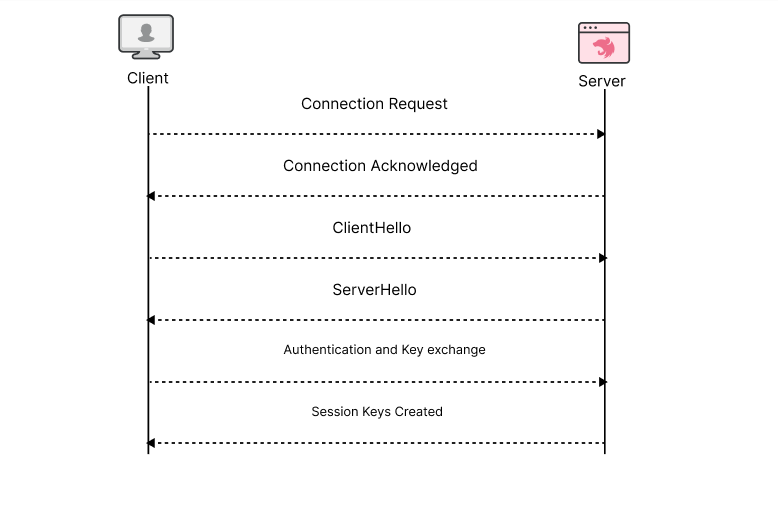
At its core, a TLS fingerprint analyzes your browser's digital handshake. When you connect to a website, your browser and the server perform a handshake that reveals what encryption your browser supports, what versions of TLS it can handle, and other technical details like the elliptic curves and signature algorithms it supports.
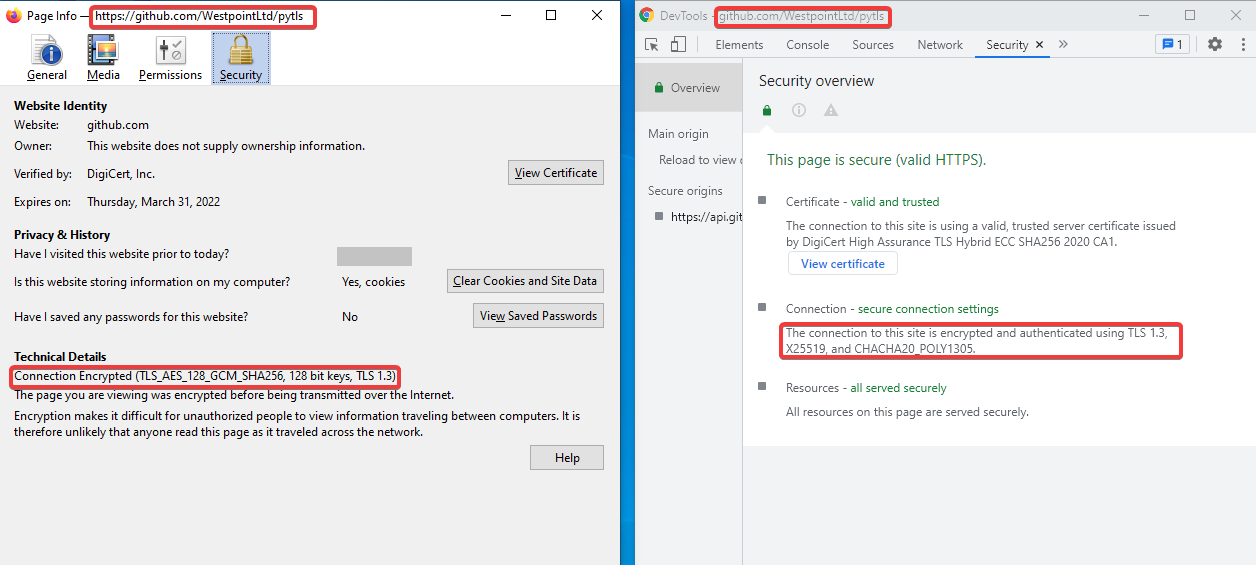
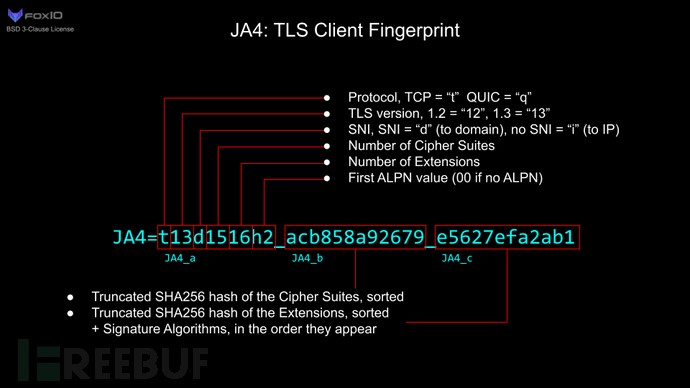
This handshake is converted into a hash - JA3 for TLS 1.2 and below, JA4 for TLS 1.3 and above. Different browsers and operating systems should have different hashes. Chrome on Windows will look different than Firefox on macOS. Simple enough, right? Well, that's where things get interesting.
Why Carders Shouldn't Lose Sleep Over This

Here's the reality: TLS fingerprints weren't designed to catch carders. They were designed to detect automated threats like:
These automated tools often use custom TLS libraries that stick out like a sore thumb. Their fingerprints scream, “I’m not a real browser!”
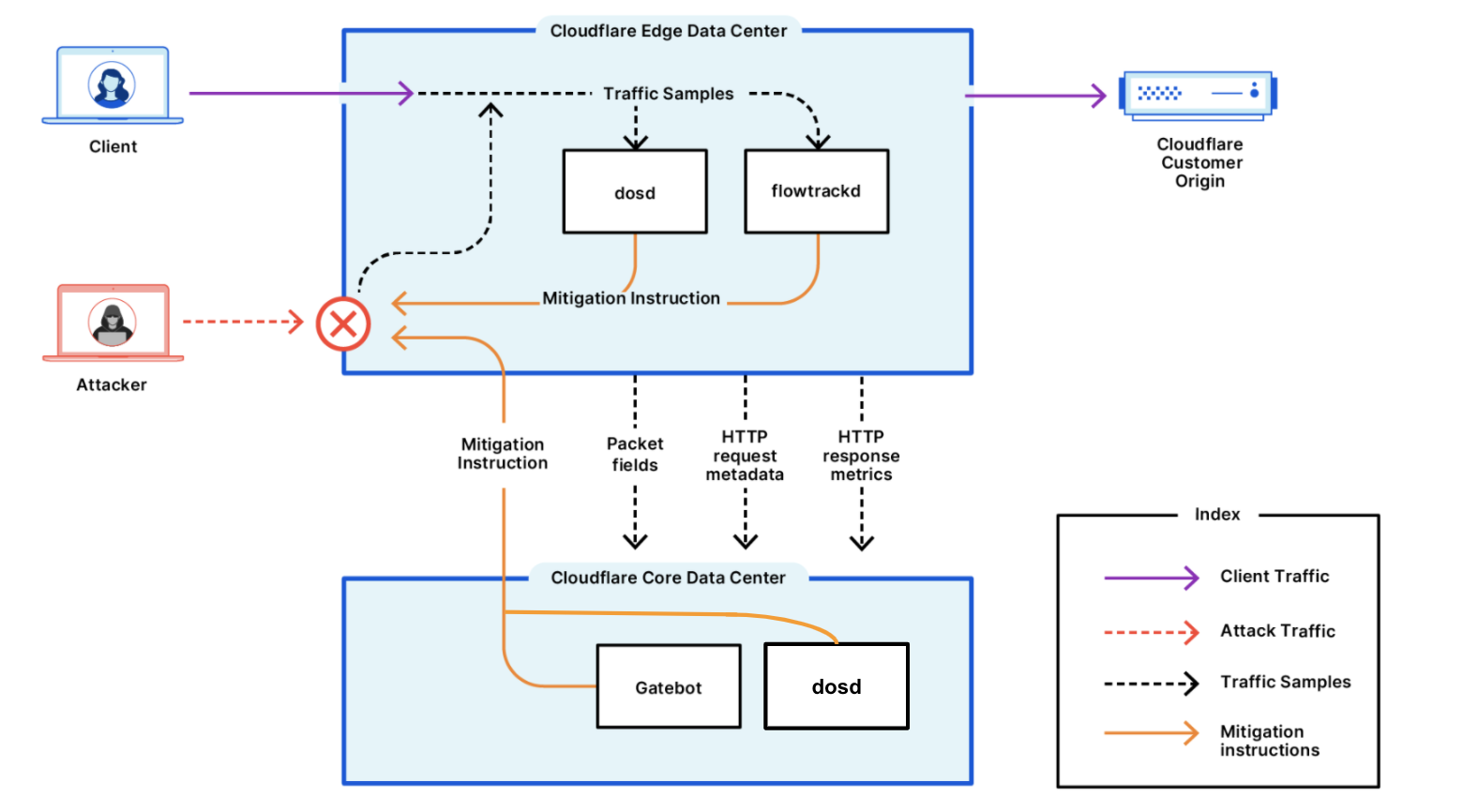
Funnily enough, this is one of the main reasons why anti-detect browsers exist in the first place. Do you think they were invented just for cheating? Nope. They were designed to perfectly mimic real browser fingerprints in ways that basic Python scripts and automation tools can’t match. Big companies use them to scrape shitty analysis and test competitors — they just don’t advertise it.
You see, a lot of the confusion among carders comes from people checking their browser fingerprints against test sites and seeing identical JA3 hashes in different anti-detect profiles. They panic, thinking that’s what’s giving them away, when in fact, they’re seeing normal behavior from that browser.
The truth is, TLS fingerprints aren’t designed to catch you trying to hack a PS5. They are designed to catch script kiddies launching DDoS attacks with crappy Python scripts and novice hackers stuffing credentials with their OpenBullet configurations .
Legitimate web scraping companies figured this out years ago. They have sophisticated browser emulation, while “elite” Telegram groups go crazy over JA3 hashes and get flagged for rookie mistakes.
Entropy

Entropy entropy entropy. I continue to include the concept of entropy in almost all of my guides that deal with anti-detection, and TLS fingerprinting is no different. As with every other aspect of anti-detection, entropy is a key concept. While JA3/JA4 hashes can identify clients, they are far from foolproof, especially for catching carders.
The problem with relying solely on JA3/JA4 is that the entropy is too damn low - too many legitimate browsers end up sharing the same or very similar fingerprints. It's like trying to catch a specific thief in a city where everyone wears the same shoes.
Plus, JA3 only looks at a few variables from the TLS handshake - SSL version cipher suite extensions and elliptic curves. It's like trying to identify someone by their shoes and hat. Good luck with that shit.
There's also no standard way to calculate these fingerprints. Different tools use different methods, meaning the same browser can show different fingerprints on different sites. And for those who know their stuff, spoofing a JA3 fingerprint is trivial — just match your TLS settings with those of a regular browser and you’ll be fine.
But here’s the biggest problem: JA3 doesn’t tell you anything about user behavior, VPN usage, or the integrity of your device. It’s just a tiny piece of a huge puzzle. Modern fraud protection systems check dozens of signals — your IP browser settings, mouse movements, typing patterns, and more. Thinking that just passing JA3 will get your transactions through is silly.
SOCKS5 vs. HTTP/HTTPS TLS
While TLS fingerprints aren’t as effective, that doesn’t mean they’re useless: your choice of proxy can still have a significant impact on your TLS fingerprint, and if the antifraud actually uses JA3/JA4 (many don’t), that’s where many of you could be screwed.
SOCKS5 proxy servers:
HTTP/HTTPS proxies:
This explains why HTTP proxies often fail advanced proxy detection, while SOCKS5 proxies pass cleanly. These checks specifically look for proxy interference with TLS handshakes. If you're obsessed with passing JA3/JA4, you'll want to use SOCKS5.
Modern anti-detect browsers have your back.
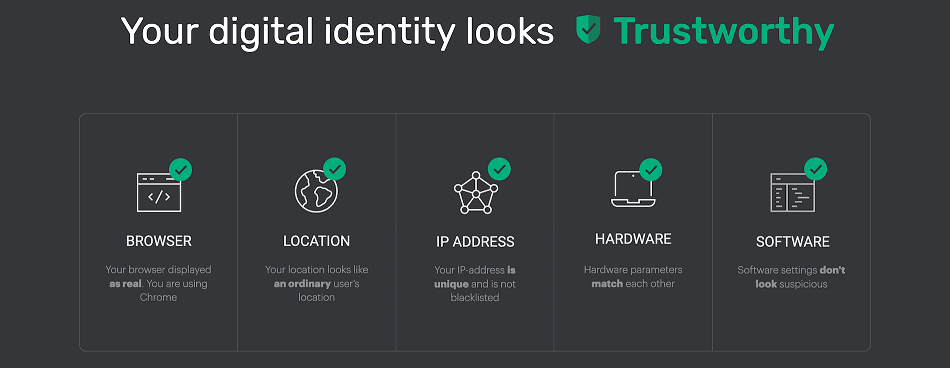
High-quality anti-detect browsers process TLS fingerprints correctly:
Testing Your Setup
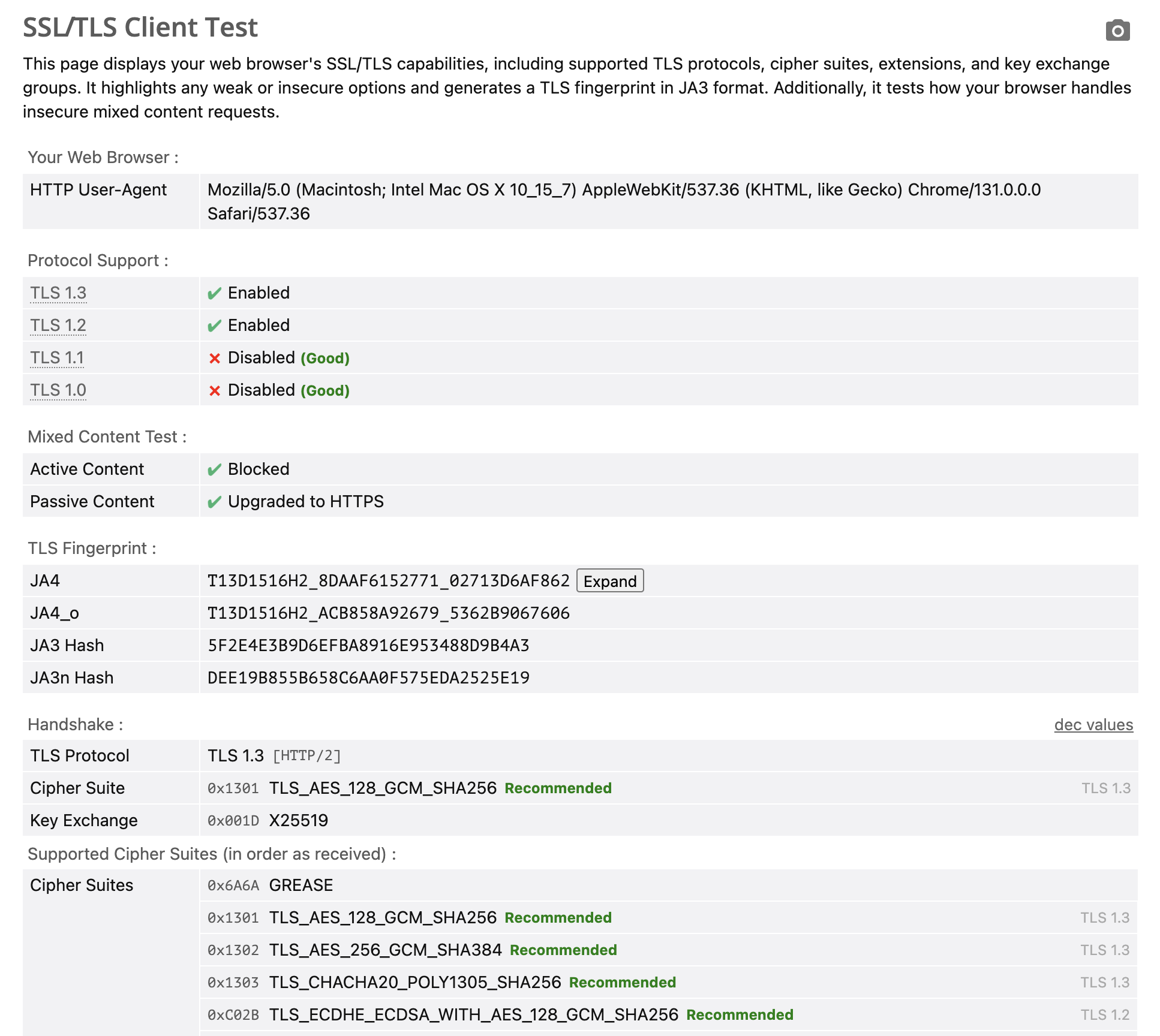
Want to test your setup? Check out these sites:
Remember: Same JA3 hashes across all profiles is normal. If your Antidetect browser shows unique hashes for each profile, that's actually suspicious.
Bottom line
TLS fingerprinting is just one of many tools for detecting automated threats. If you're using a solid antidetect browser and not using mass automation, you're probably fine.
Focus on the basics: a quality antidetect browser and reliable SOCKS5 proxies. Let the automation developers worry about JA3 hashes. Your job is to look like a legitimate user, which any decent antidetect browser should be able to handle.
And remember, if someone is hyping up TLS fingerprinting as some kind of unstoppable threat, trying to sell you their "undetectable solution," they're probably full of shit. Vendors who make money off of FUD are usually the ones who understand these systems the least. Stick to the basics, and you'll be fine.
(c) Telegram: d0ctrine
Our chat in Telegram: BinX Labs
There’s something that’s been popping up in the scam community lately — a supposed god of all TLS fingerprinting methods. These self-proclaimed “experts” act like JA3/JA4 hashes are some mystical force that will instantly catch you out. Meanwhile, they completely ignore the dozens of basic rookie mistakes that actually get them flagged. Let’s talk about why this is overblown paranoia and distracting you from what’s really important.
What are TLS fingerprints anyway?
At its core, a TLS fingerprint analyzes your browser's digital handshake. When you connect to a website, your browser and the server perform a handshake that reveals what encryption your browser supports, what versions of TLS it can handle, and other technical details like the elliptic curves and signature algorithms it supports.
This handshake is converted into a hash - JA3 for TLS 1.2 and below, JA4 for TLS 1.3 and above. Different browsers and operating systems should have different hashes. Chrome on Windows will look different than Firefox on macOS. Simple enough, right? Well, that's where things get interesting.
Why Carders Shouldn't Lose Sleep Over This
Here's the reality: TLS fingerprints weren't designed to catch carders. They were designed to detect automated threats like:
- Bots that hack websites
- Bulk account creation
- Web scrapers
These automated tools often use custom TLS libraries that stick out like a sore thumb. Their fingerprints scream, “I’m not a real browser!”
Funnily enough, this is one of the main reasons why anti-detect browsers exist in the first place. Do you think they were invented just for cheating? Nope. They were designed to perfectly mimic real browser fingerprints in ways that basic Python scripts and automation tools can’t match. Big companies use them to scrape shitty analysis and test competitors — they just don’t advertise it.
You see, a lot of the confusion among carders comes from people checking their browser fingerprints against test sites and seeing identical JA3 hashes in different anti-detect profiles. They panic, thinking that’s what’s giving them away, when in fact, they’re seeing normal behavior from that browser.
The truth is, TLS fingerprints aren’t designed to catch you trying to hack a PS5. They are designed to catch script kiddies launching DDoS attacks with crappy Python scripts and novice hackers stuffing credentials with their OpenBullet configurations .
Legitimate web scraping companies figured this out years ago. They have sophisticated browser emulation, while “elite” Telegram groups go crazy over JA3 hashes and get flagged for rookie mistakes.
Entropy
Entropy entropy entropy. I continue to include the concept of entropy in almost all of my guides that deal with anti-detection, and TLS fingerprinting is no different. As with every other aspect of anti-detection, entropy is a key concept. While JA3/JA4 hashes can identify clients, they are far from foolproof, especially for catching carders.
The problem with relying solely on JA3/JA4 is that the entropy is too damn low - too many legitimate browsers end up sharing the same or very similar fingerprints. It's like trying to catch a specific thief in a city where everyone wears the same shoes.
Plus, JA3 only looks at a few variables from the TLS handshake - SSL version cipher suite extensions and elliptic curves. It's like trying to identify someone by their shoes and hat. Good luck with that shit.
There's also no standard way to calculate these fingerprints. Different tools use different methods, meaning the same browser can show different fingerprints on different sites. And for those who know their stuff, spoofing a JA3 fingerprint is trivial — just match your TLS settings with those of a regular browser and you’ll be fine.
But here’s the biggest problem: JA3 doesn’t tell you anything about user behavior, VPN usage, or the integrity of your device. It’s just a tiny piece of a huge puzzle. Modern fraud protection systems check dozens of signals — your IP browser settings, mouse movements, typing patterns, and more. Thinking that just passing JA3 will get your transactions through is silly.
SOCKS5 vs. HTTP/HTTPS TLS
While TLS fingerprints aren’t as effective, that doesn’t mean they’re useless: your choice of proxy can still have a significant impact on your TLS fingerprint, and if the antifraud actually uses JA3/JA4 (many don’t), that’s where many of you could be screwed.
SOCKS5 proxy servers:
- Acts as a clear tunnel, passing your TLS handshake unmodified.
- Keeps your original fingerprint. Your browser's signature is what the server sees, even if it goes through a proxy IP.
- Ideal for carding as it does not spoil your carefully crafted browser fingerprint.
HTTP/HTTPS proxies:
- Terminates and re-creates TLS connections. This means that the proxy server essentially acts as a "man in the middle" in your connection.
- Changes your original fingerprint. The server sees the proxy fingerprint, not yours.
- Often runs extended proxy detection. These checks specifically look for this type of TLS handshake interference.
This explains why HTTP proxies often fail advanced proxy detection, while SOCKS5 proxies pass cleanly. These checks specifically look for proxy interference with TLS handshakes. If you're obsessed with passing JA3/JA4, you'll want to use SOCKS5.
Modern anti-detect browsers have your back.
High-quality anti-detect browsers process TLS fingerprints correctly:
- Accurate emulation of browser handshakes: they reproduce real browser behavior down to the specific cipher suites.
- Implementing the Right TLS Versions: They Don't Just Claim Support - They Actually Implement It Right
- Proxy connection management: They work seamlessly with SOCKS5 proxies and can resolve HTTP proxy fingerprinting issues.
Testing Your Setup
Want to test your setup? Check out these sites:
- https://tls.peet.ws/api/clean
- https://ja3er.com/json
- https://tools.scrapfly.io/api/fp/ja3
- https://browserleaks.com/tls
Remember: Same JA3 hashes across all profiles is normal. If your Antidetect browser shows unique hashes for each profile, that's actually suspicious.
Bottom line
TLS fingerprinting is just one of many tools for detecting automated threats. If you're using a solid antidetect browser and not using mass automation, you're probably fine.
Focus on the basics: a quality antidetect browser and reliable SOCKS5 proxies. Let the automation developers worry about JA3 hashes. Your job is to look like a legitimate user, which any decent antidetect browser should be able to handle.
And remember, if someone is hyping up TLS fingerprinting as some kind of unstoppable threat, trying to sell you their "undetectable solution," they're probably full of shit. Vendors who make money off of FUD are usually the ones who understand these systems the least. Stick to the basics, and you'll be fine.
(c) Telegram: d0ctrine
Our chat in Telegram: BinX Labs
 ort your_target.com.