


Picture this: You have a new card, a good aim, and you're ready to hit the jackpot. Then a wild 3DS prompt comes along and crushes your dreams faster than a bouncer spotting a fake ID. Sound familiar? Welcome to the curse of modern carding.
3D Secure, or 3DS as we call it in the trenches, has been our enemy for years. But here’s the thing – knowledge is power, and we’re going to arm you with plenty of it.
In this two-part guide, we’re going to tear the 3DS apart from the inside out. Part 1 will cover the basic history and general workings of the 3DS. Part 2 will dive even deeper into the technical side and show you how to test BINs and real-world scenarios.
Now, let’s get one thing straight – if you’re here looking for a list of non-VBV BINs, you’re in the wrong place. Those are already scattered all over Telegram and this forum. We’re not here to hold your hand and give you a magic list. Instead, we’re going to dive into the real meat of it – teaching you how to fish out those golden BINs yourself.
So grab your favorite beverage, tell your Telegram groups you’re going dark for a while, and let’s get to 3D Secure. Your future results will thank you.
What the hell is the 3DS? The history lesson you didn't ask for
Alright, kids, gather around, it's time for a history lesson. While some dog carders are still scratching their heads over the 3DS in 2024 like it's some new technology, this thing has been around since 2001. Yes, you heard that right: it's old enough to drink in the States.
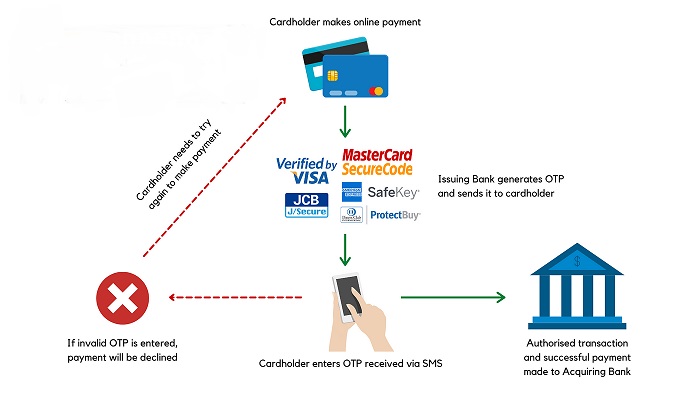
3D Secure, or 3DS for those of us who don’t want to bother with the extra syllables, stands for Three Domain Secure. This isn’t some fancy 3D graphics nonsense, despite its name – it’s three domains that work together to make our lives difficult:
Acquirer Domain: the merchant and their bank
Issuer Domain: the cardholder’s bank
Interaction Domain: the payment system that makes it all work (think Visa, Mastercard)
Back in the Wild West days, e-commerce fraud was so rampant that today’s carding scene looks like a picnic. We’re talking 50% of disputed transactions in Visa Europe in 1998 were e-commerce related. Merchants were getting chewed out and card issuers were bleeding money faster than a dumbass getting stabbed in a knife fight.
So in 2001, Visa decided to spoil the party and released 3DS. The idea was simple: add an extra layer of security to online transactions. No more "card numbers and you're done." Cardholders now had to jump through extra hoops — usually entering a password — to prove they weren't scammers living in their basement.
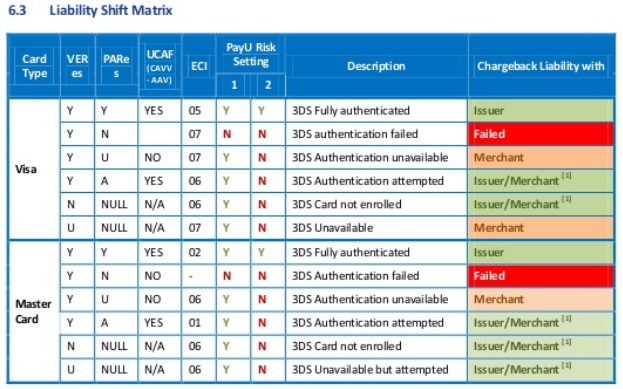
Why did merchants sign up for this headache? Two words: liability transfer. With 3DS, if a transaction goes through and then turns out to be fraudulent, it’s the issuing bank’s problem, not the merchant’s. Suddenly, merchants were rubbing their hands in glee that they weren’t eating chargebacks for breakfast, lunch, and dinner.
Enter Cardinal Commerce. These clever scoundrels saw an opportunity in the 3DS mess and positioned themselves as the middlemen of the middlemen. They’re like the bouncers of the digital payments world, hired by banks to do the dirty work of authenticating 3DS.
Why would banks use these third-party providers? Simple. Implementing and maintaining 3DS is a pain. It’s like trying to teach your grandma how to use TikTok — it’s technically possible, but why bother when you can pay someone else to handle the headache? Companies like Cardinal Commerce do just that, offering banks a solution to their problems. That’s why you’ll see Cardinal Commerce in HTTP logs more often during the 3DS era.
3DS 1.0 was about as user-friendly as a cactus dildo. Cardholders were forgetting passwords, abandoning carts, and generally hating life. Conversion rates plummeted, and merchants were caught between a rock and a hard place — fraud protection or upselling?
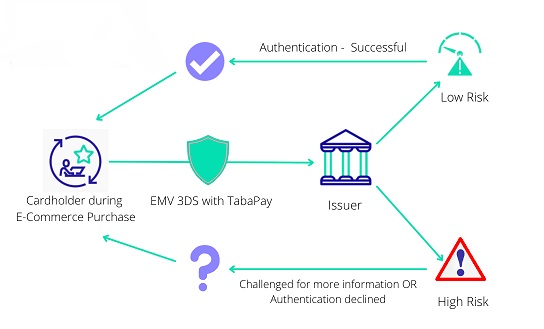
Then in 2016, we got 3DS 2.0. This update was supposed to make the process smoother than the well-oiled… well, you get the idea. Instead of clunky passwords, it uses risk-based authentication. The system now analyzes over 100 data points in the background to decide whether to contact the cardholder for additional verification.
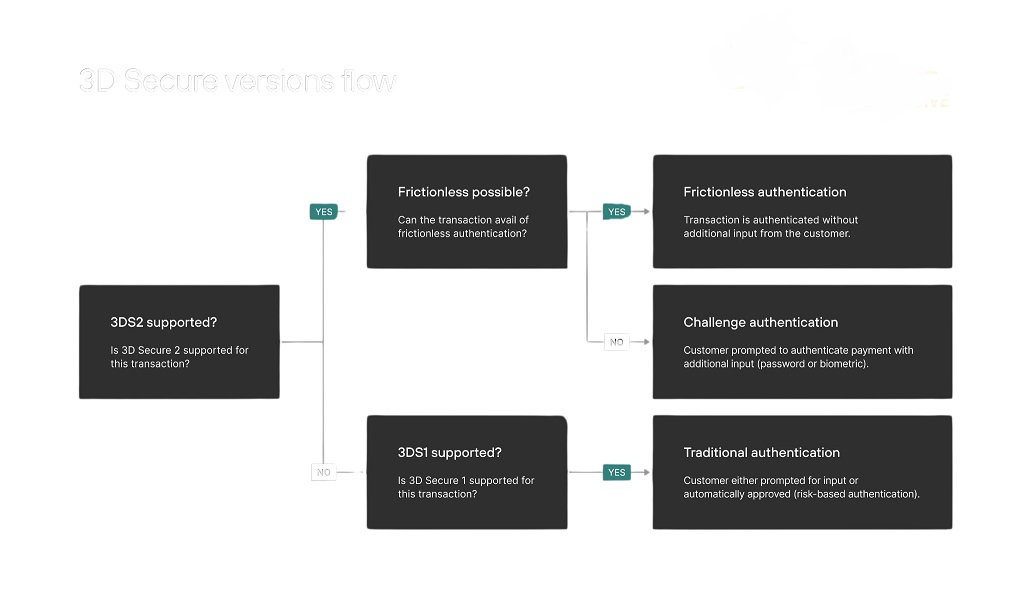
Today, 3DS is run by EMVCo, a consortium that sounds like a supervillain organization but is actually run by EuroPay, Mastercard, and Visa. It’s become an industry standard, with every major card network on board.
From the fraud-fighting hero to the conversion-killing villain and back again. It’s been blocking carders for over 20 years, and it’s not going anywhere. But don’t worry — where there’s a will (and a bunch of smart bastards like us), there’s a way.
How does it work?
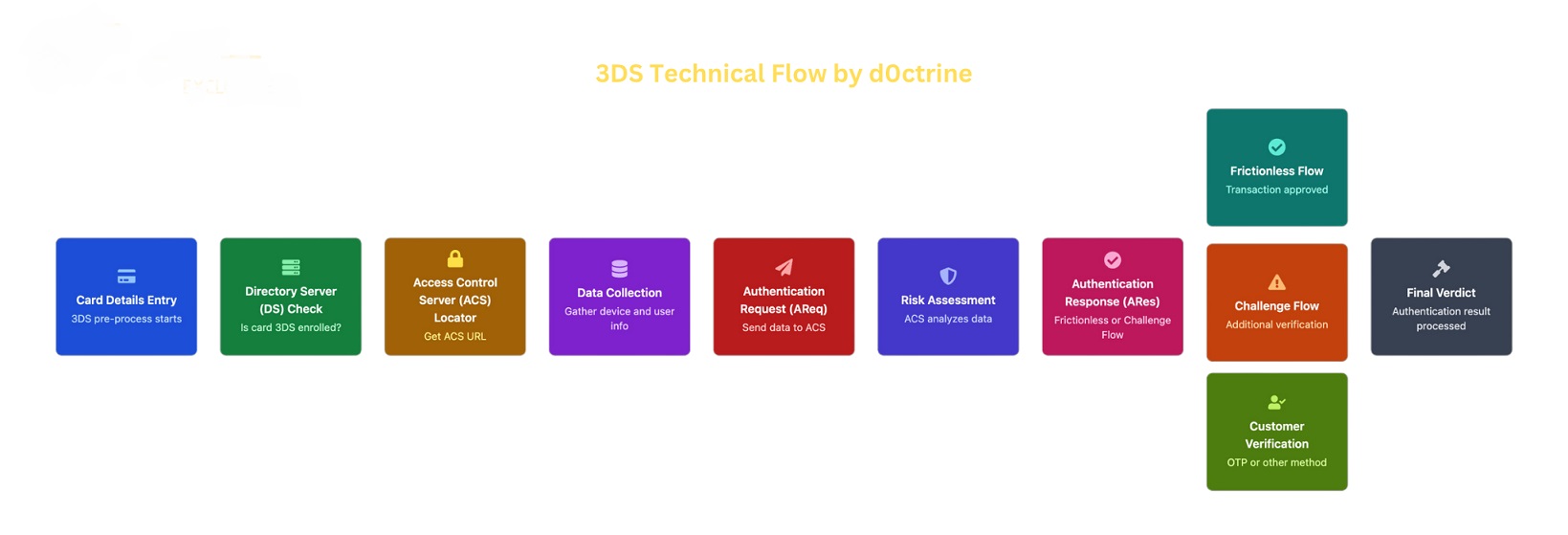
When someone pays online, here’s what happens behind the scenes:
Card data entry: Once those numbers hit the merchant’s site, 3DS pre-processing begins.
Directory Server (DS) check: The merchant’s 3DS server sends a DS query, essentially asking, “Is this card part of the 3DS Club?”
Access Control Server (ACS) Locator: If the card is registered, DS returns the card’s ACS URL – think of it as the card’s access blocker.
Data Collection: The 3DS now functions as a full-fledged security service, collecting everything from device information to the customer’s zodiac sign.
Authentication Request (AReq): All this important data is combined and sent to the ACS.
Risk Assessment: The ACS runs this data through its bullshit detector.
Authentication Response (ARes): Based on its assessment, the ACS decides whether to:
a) Greenlight the transaction (Non-Stop Flow)
b) Challenge (Challenge Flow)
Verification Flow (if running): The customer must prove their legitimacy, possibly with a one-time password or by sacrificing their firstborn.
Final Verdict: The 3DS receives the authentication result. If it’s a thumbs up, the payment goes through.
The 3DS trinity: challenge, ease, and no show.
Now let's figure it out:
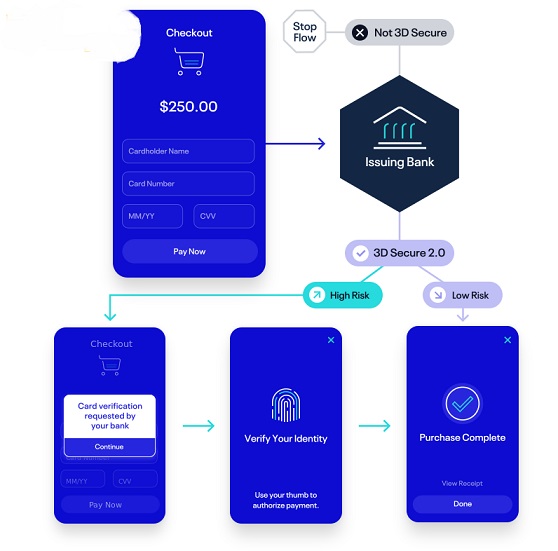
1. Flow:
• What it looks like: A pop-up asking for additional verification.
• Methods: OTP, biometrics, security questions.
• For carders: Typically where your transaction goes wrong.
2. Frictionless Flow:
• What it looks like: Nothing. The user doesn’t even know 3DS has happened.
• Behind the scenes: The ACS issues you a pass based on a risk score.
• For carders: This is what you’re aiming for. Cards called AUTOSKIP pass this with ease.
3. No 3DS:
• What it looks like: Standard verification with no extra steps.
• Behind the scenes: The transaction proceeds straight to authorization.
• For carders: The Holy Grail. This is where terms like NONVBV come into play.
Bank-Side Triggers:
The issuer bank’s trigger system is like a paranoid bouncer with a very specific shit list:
Transaction Amount: Unexpected large purchases or amounts that are out of the cardholder’s normal spending pattern.
Geolocation: Transactions from countries the cardholder has never been to.
Merchant Category: Certain high-risk categories always trigger 3DS, such as online gambling or adult entertainment.
Speed: Fast transactions that make the card seem like it’s being passed around like a joint.
New Merchant: First transactions with a merchant the cardholder hasn’t used before.
Processor-Side Triggers:
This is where the ones written into my AI fraud detection systems come into play, analyzing a huge number of data points:
Device Fingerprint: A unique digital identifier for your device and browser.
Behavioral Biometrics: The way you type, move your mouse – essentially your digital body language.
Historical Patterns: Previous transactions associated with a card, email, or device.
Network Analysis: The connections between different transactions and accounts, like a digital spider’s web.
Trigger Interactions:
Here’s the thing – the bank and the processor don’t always see eye to eye. This creates a matrix of possible outcomes:
Clean Pass: You slip past both. Good job, you sneaky devil.
Bank 3DS: The bank gets scared and fires up the 3DS, screw the processor.
Processor 3DS: The processor’s AI senses something is wrong and demands the 3DS.
Double Whammy: Both flag you down. At this point, you might as well be wearing an “I’m a Fraud” T-shirt.
Advanced Fuck:
Selective 3DS: Some merchants only use 3DS above certain amounts. Aim like a sniper.
Soft Decline Exploit: Some issuers use “soft declines” instead of 3DS. This can be exploited with the right retry strategy.
3DS Downgrade: In rare cases, you can force 3DS1 authentication instead of 3DS2, but this introduces more vulnerabilities.
NONVBV: Some banks don’t support 3DS at all. In the carder world, this is called NONVBV. Without 3DS, these transactions are a walk in the park.
AUTOSKIP: Some banks implement a 3DS proxy that always pushes you through a smooth flow – no hassle, just a green light. Carders and merchants know them as AUTOSKIP. Find them and you’re good to go.
Conclusion: 3DS – Know Your Enemy
We’ve gone deep down the 3DS rabbit hole, and if your head isn’t spinning, you haven’t been paying attention.
So, let’s recap:
3DS is nothing new – it’s been blocking carders since the dawn of time.
It’s a three-way tango between the Buyer, Issuer, and Interaction domains.
Passing the buck is why merchants are buying up their jeans on 3DS.
There are three options: Challenge Flow, Frictionless Flow, and No 3DS.
Both banks and processors can run 3DS, it’s a complex web of crap.
We’ve only just begun. In Part 2 of this guide, we’ll dive even deeper into the technical side of 3DS. We’ll show you:
What SCA (Strong Customer Authentication) is
How merchants see these transactions
How to check a BIN for 3DS support
Real-world examples with real stores (because theory is great, but practice pays the bills)
We’ll also cover advanced techniques like Selective 3DS, Soft Decline Exploitation, and the holy grail of cards NONVBV and AUTOSKIP.
Remember, understanding the 3DS isn’t just about beating it, it’s about knowing when and why it’s triggered in the first place. It’s the difference between playing checkers and 4D chess in the carding world.
So until next time, keep your wits and your cards sharp. And for heaven’s sake, don’t just insert random BINs into every store you see. That’s amateur hour crap, and you’re better than that.
Class disbanded, you sweet carders. See you in part two, where we turn this into cold hard cash.
3D Secure, or 3DS as we call it in the trenches, has been our enemy for years. But here’s the thing – knowledge is power, and we’re going to arm you with plenty of it.
In this two-part guide, we’re going to tear the 3DS apart from the inside out. Part 1 will cover the basic history and general workings of the 3DS. Part 2 will dive even deeper into the technical side and show you how to test BINs and real-world scenarios.
Now, let’s get one thing straight – if you’re here looking for a list of non-VBV BINs, you’re in the wrong place. Those are already scattered all over Telegram and this forum. We’re not here to hold your hand and give you a magic list. Instead, we’re going to dive into the real meat of it – teaching you how to fish out those golden BINs yourself.
So grab your favorite beverage, tell your Telegram groups you’re going dark for a while, and let’s get to 3D Secure. Your future results will thank you.
What the hell is the 3DS? The history lesson you didn't ask for
Alright, kids, gather around, it's time for a history lesson. While some dog carders are still scratching their heads over the 3DS in 2024 like it's some new technology, this thing has been around since 2001. Yes, you heard that right: it's old enough to drink in the States.
3D Secure, or 3DS for those of us who don’t want to bother with the extra syllables, stands for Three Domain Secure. This isn’t some fancy 3D graphics nonsense, despite its name – it’s three domains that work together to make our lives difficult:
Acquirer Domain: the merchant and their bank
Issuer Domain: the cardholder’s bank
Interaction Domain: the payment system that makes it all work (think Visa, Mastercard)
Back in the Wild West days, e-commerce fraud was so rampant that today’s carding scene looks like a picnic. We’re talking 50% of disputed transactions in Visa Europe in 1998 were e-commerce related. Merchants were getting chewed out and card issuers were bleeding money faster than a dumbass getting stabbed in a knife fight.
So in 2001, Visa decided to spoil the party and released 3DS. The idea was simple: add an extra layer of security to online transactions. No more "card numbers and you're done." Cardholders now had to jump through extra hoops — usually entering a password — to prove they weren't scammers living in their basement.
Why did merchants sign up for this headache? Two words: liability transfer. With 3DS, if a transaction goes through and then turns out to be fraudulent, it’s the issuing bank’s problem, not the merchant’s. Suddenly, merchants were rubbing their hands in glee that they weren’t eating chargebacks for breakfast, lunch, and dinner.
Enter Cardinal Commerce. These clever scoundrels saw an opportunity in the 3DS mess and positioned themselves as the middlemen of the middlemen. They’re like the bouncers of the digital payments world, hired by banks to do the dirty work of authenticating 3DS.
Why would banks use these third-party providers? Simple. Implementing and maintaining 3DS is a pain. It’s like trying to teach your grandma how to use TikTok — it’s technically possible, but why bother when you can pay someone else to handle the headache? Companies like Cardinal Commerce do just that, offering banks a solution to their problems. That’s why you’ll see Cardinal Commerce in HTTP logs more often during the 3DS era.
3DS 1.0 was about as user-friendly as a cactus dildo. Cardholders were forgetting passwords, abandoning carts, and generally hating life. Conversion rates plummeted, and merchants were caught between a rock and a hard place — fraud protection or upselling?
Then in 2016, we got 3DS 2.0. This update was supposed to make the process smoother than the well-oiled… well, you get the idea. Instead of clunky passwords, it uses risk-based authentication. The system now analyzes over 100 data points in the background to decide whether to contact the cardholder for additional verification.
Today, 3DS is run by EMVCo, a consortium that sounds like a supervillain organization but is actually run by EuroPay, Mastercard, and Visa. It’s become an industry standard, with every major card network on board.
From the fraud-fighting hero to the conversion-killing villain and back again. It’s been blocking carders for over 20 years, and it’s not going anywhere. But don’t worry — where there’s a will (and a bunch of smart bastards like us), there’s a way.
How does it work?
When someone pays online, here’s what happens behind the scenes:
Card data entry: Once those numbers hit the merchant’s site, 3DS pre-processing begins.
Directory Server (DS) check: The merchant’s 3DS server sends a DS query, essentially asking, “Is this card part of the 3DS Club?”
Access Control Server (ACS) Locator: If the card is registered, DS returns the card’s ACS URL – think of it as the card’s access blocker.
Data Collection: The 3DS now functions as a full-fledged security service, collecting everything from device information to the customer’s zodiac sign.
Authentication Request (AReq): All this important data is combined and sent to the ACS.
Risk Assessment: The ACS runs this data through its bullshit detector.
Authentication Response (ARes): Based on its assessment, the ACS decides whether to:
a) Greenlight the transaction (Non-Stop Flow)
b) Challenge (Challenge Flow)
Verification Flow (if running): The customer must prove their legitimacy, possibly with a one-time password or by sacrificing their firstborn.
Final Verdict: The 3DS receives the authentication result. If it’s a thumbs up, the payment goes through.
The 3DS trinity: challenge, ease, and no show.
Now let's figure it out:
1. Flow:
• What it looks like: A pop-up asking for additional verification.
• Methods: OTP, biometrics, security questions.
• For carders: Typically where your transaction goes wrong.
2. Frictionless Flow:
• What it looks like: Nothing. The user doesn’t even know 3DS has happened.
• Behind the scenes: The ACS issues you a pass based on a risk score.
• For carders: This is what you’re aiming for. Cards called AUTOSKIP pass this with ease.
3. No 3DS:
• What it looks like: Standard verification with no extra steps.
• Behind the scenes: The transaction proceeds straight to authorization.
• For carders: The Holy Grail. This is where terms like NONVBV come into play.
Remember: The 3DS isn't just activated by one entity. It's a two-headed beast, with both the issuing bank and the payment processor ready to unleash a barrage of emotions on you.
Bank-Side Triggers:
The issuer bank’s trigger system is like a paranoid bouncer with a very specific shit list:
Transaction Amount: Unexpected large purchases or amounts that are out of the cardholder’s normal spending pattern.
Geolocation: Transactions from countries the cardholder has never been to.
Merchant Category: Certain high-risk categories always trigger 3DS, such as online gambling or adult entertainment.
Speed: Fast transactions that make the card seem like it’s being passed around like a joint.
New Merchant: First transactions with a merchant the cardholder hasn’t used before.
Processor-Side Triggers:
This is where the ones written into my AI fraud detection systems come into play, analyzing a huge number of data points:
Device Fingerprint: A unique digital identifier for your device and browser.
Behavioral Biometrics: The way you type, move your mouse – essentially your digital body language.
Historical Patterns: Previous transactions associated with a card, email, or device.
Network Analysis: The connections between different transactions and accounts, like a digital spider’s web.
Trigger Interactions:
Here’s the thing – the bank and the processor don’t always see eye to eye. This creates a matrix of possible outcomes:
Clean Pass: You slip past both. Good job, you sneaky devil.
Bank 3DS: The bank gets scared and fires up the 3DS, screw the processor.
Processor 3DS: The processor’s AI senses something is wrong and demands the 3DS.
Double Whammy: Both flag you down. At this point, you might as well be wearing an “I’m a Fraud” T-shirt.
Advanced Fuck:
Selective 3DS: Some merchants only use 3DS above certain amounts. Aim like a sniper.
Soft Decline Exploit: Some issuers use “soft declines” instead of 3DS. This can be exploited with the right retry strategy.
3DS Downgrade: In rare cases, you can force 3DS1 authentication instead of 3DS2, but this introduces more vulnerabilities.
NONVBV: Some banks don’t support 3DS at all. In the carder world, this is called NONVBV. Without 3DS, these transactions are a walk in the park.
AUTOSKIP: Some banks implement a 3DS proxy that always pushes you through a smooth flow – no hassle, just a green light. Carders and merchants know them as AUTOSKIP. Find them and you’re good to go.
Conclusion: 3DS – Know Your Enemy
We’ve gone deep down the 3DS rabbit hole, and if your head isn’t spinning, you haven’t been paying attention.
So, let’s recap:
3DS is nothing new – it’s been blocking carders since the dawn of time.
It’s a three-way tango between the Buyer, Issuer, and Interaction domains.
Passing the buck is why merchants are buying up their jeans on 3DS.
There are three options: Challenge Flow, Frictionless Flow, and No 3DS.
Both banks and processors can run 3DS, it’s a complex web of crap.
We’ve only just begun. In Part 2 of this guide, we’ll dive even deeper into the technical side of 3DS. We’ll show you:
What SCA (Strong Customer Authentication) is
How merchants see these transactions
How to check a BIN for 3DS support
Real-world examples with real stores (because theory is great, but practice pays the bills)
We’ll also cover advanced techniques like Selective 3DS, Soft Decline Exploitation, and the holy grail of cards NONVBV and AUTOSKIP.
Remember, understanding the 3DS isn’t just about beating it, it’s about knowing when and why it’s triggered in the first place. It’s the difference between playing checkers and 4D chess in the carding world.
So until next time, keep your wits and your cards sharp. And for heaven’s sake, don’t just insert random BINs into every store you see. That’s amateur hour crap, and you’re better than that.
Class disbanded, you sweet carders. See you in part two, where we turn this into cold hard cash.
 The Liability Shift Is the Real Game-Changer
 Frictionless ≠ Invisible
 BIN Testing: Beyond “Non-VBV” Hype
 The Dual-Layer Threat Model: Bank vs. Processor
 AUTOSKIP: Not Magic — Just Misconfigured Risk Engines
 Final Thoughts