


Many newbies keep PMing me asking the same thing: “What are your settings? What proxy provider are you using? What antidetect are you using?” You know what? I’m sick of it. That’s why I wrote this guide. This is the carding device setup I personally use, and why I use it. Hopefully, this will fill your wallets while you’re going through the tough times of carding in 2025.
Understanding the Carding Setup
If you’ve been paying attention to my guides, you’ll know that I’m a huge proponent of the iPhone as a carding device. I’ve gone into detail about why that’s a good topic here: iPhone: The Carder’s Ultimate Tool.
So it’s no surprise that I do 60% of all my carding with my iPhone. But telling you to just buy an iPhone would be a huge letdown, right? So for the remaining 40%, where I use my laptop, this guide will break down my setup. Most of the tools and services here are cross-platform, meaning you can use them on any OS, but for the best results and highest success rate, I recommend using Apple devices. They give you low entropy since most devices look the same, so you get a higher margin of error when carding.
Proxy Provider
I switch proxy providers like a paranoid dealer switches burner phones. There are many reasons to do this, but I have been going with SmartProxy for a long time.
Why? Because it meets my four must-have criteria:
Unique IP addresses

Okay, let's get past the "unique IP" marketing nonsense. Proxyway did a good experiment to uncover the truth about residential proxy pools. They didn't just take these providers' hyped claims at face value. They put them to the test, hammering them with hundreds of thousands of requests and cross-referencing the IP addresses with MaxMind and IP2Location.
They wanted to see how many unique IP addresses each provider actually provided, how many of them were on different C-level subnets (important to avoid getting banned), and whether they were legitimate residential addresses.
SMARTPROXY
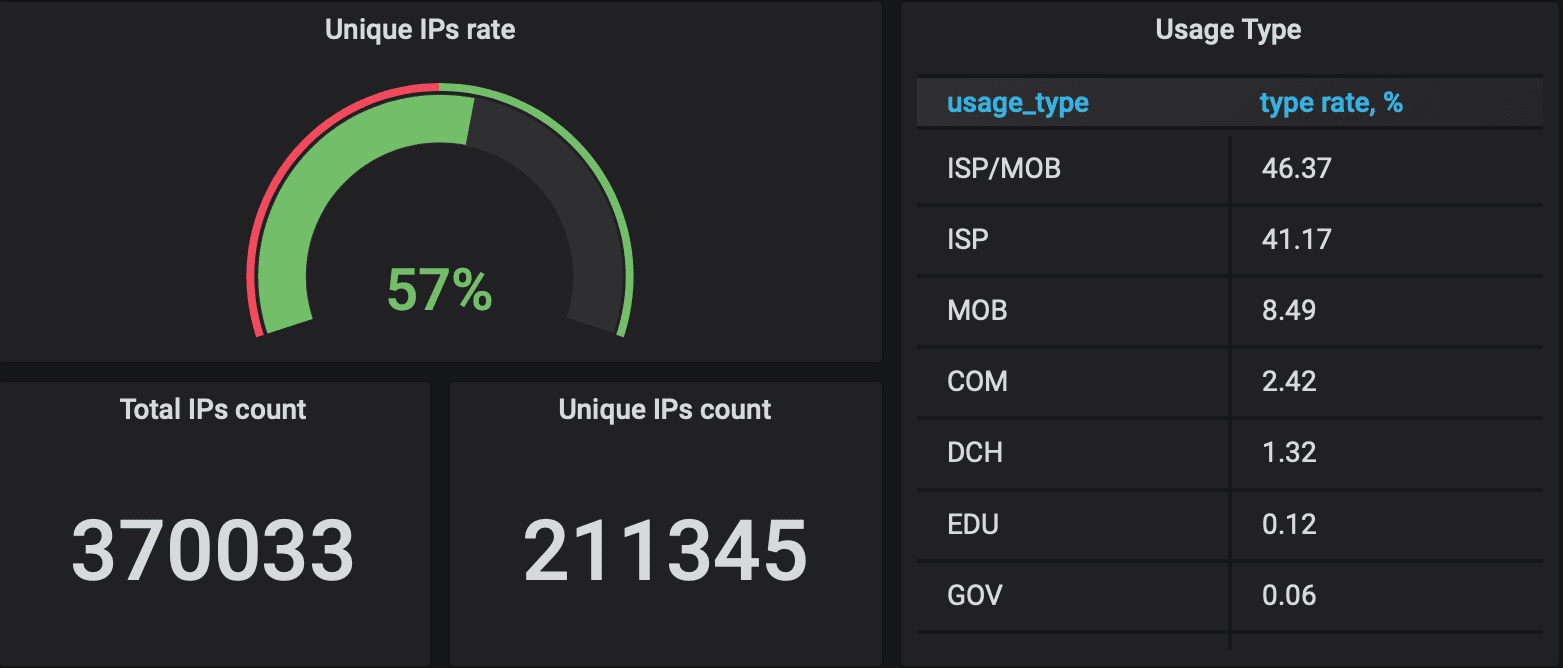
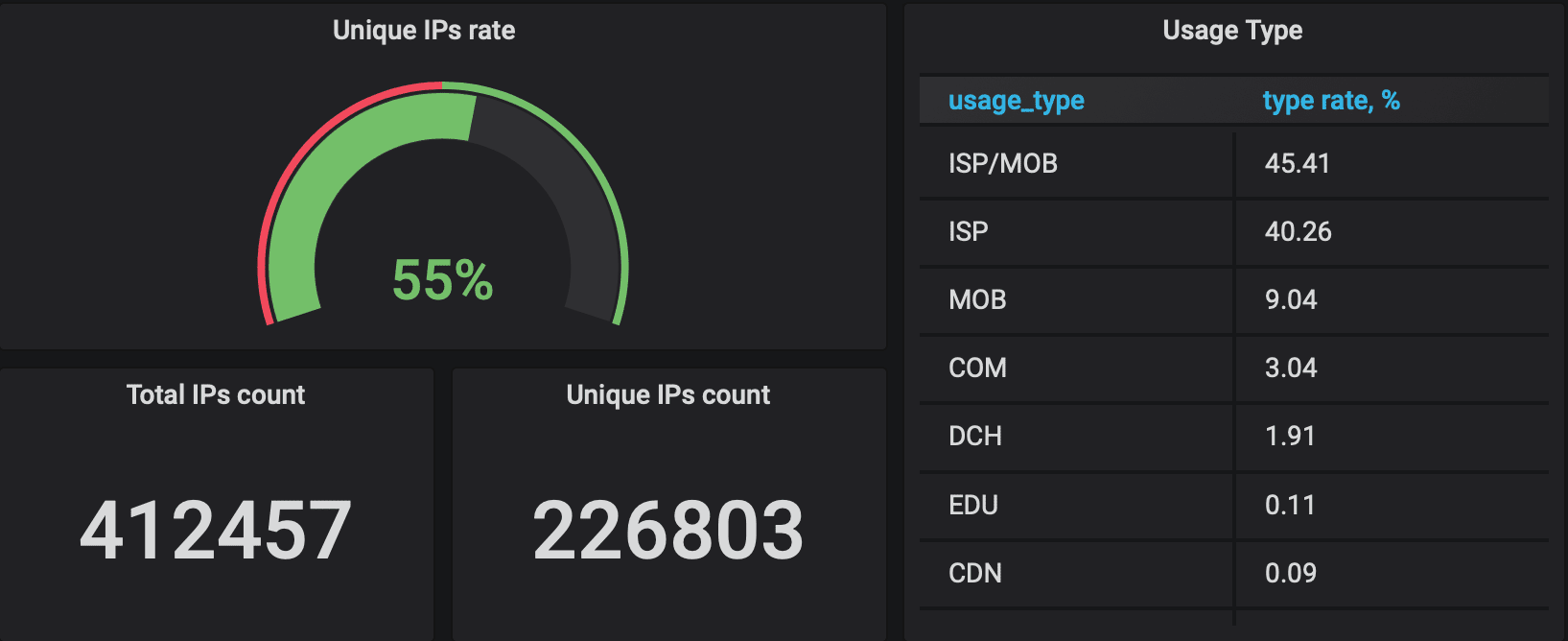
Smartproxy came out on top, boasting 57% of unique IPs with 37% in unique class C subnets. They claim 10 million IPs, and those numbers suggest they're not exactly full of crap. Oxylabs was in second place, but the rest? Bloody shame. Luminati, the supposed king of the hill, only managed to get a measly 15% of unique IPs. RSocks and PacketStream did even worse. NetNut had a decent amount of unique IPs, but they were almost all in the same subnet. Most of the other proxy fuckers are just reselling from these larger pools, so they're more or less the same crap.
OXYLABS
NETWORK
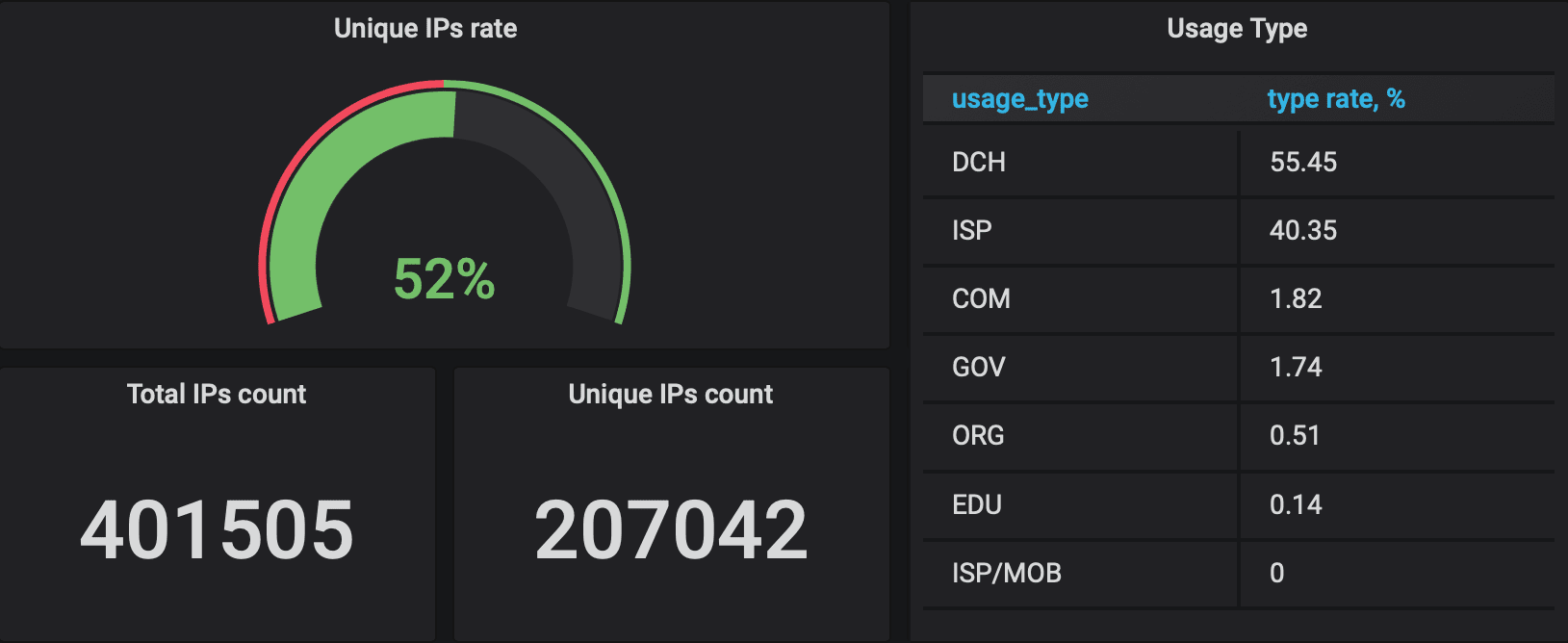
Bottom line? Most of these providers inflate their numbers. They probably count IP addresses over weeks or months, not what is available at any given time. Smartproxy seems to be the least deceptive, but always ask these providers how they calculate their pool size before you hand over your hard-earned cash.
Smartproxy Script
Look, I'm all about efficiency. No one has time to manually configure a proxy every damn time. So to make my life easier, I whipped up a little script that I run in my terminal. I just type in the zip code I need and boom! I get a new IP.
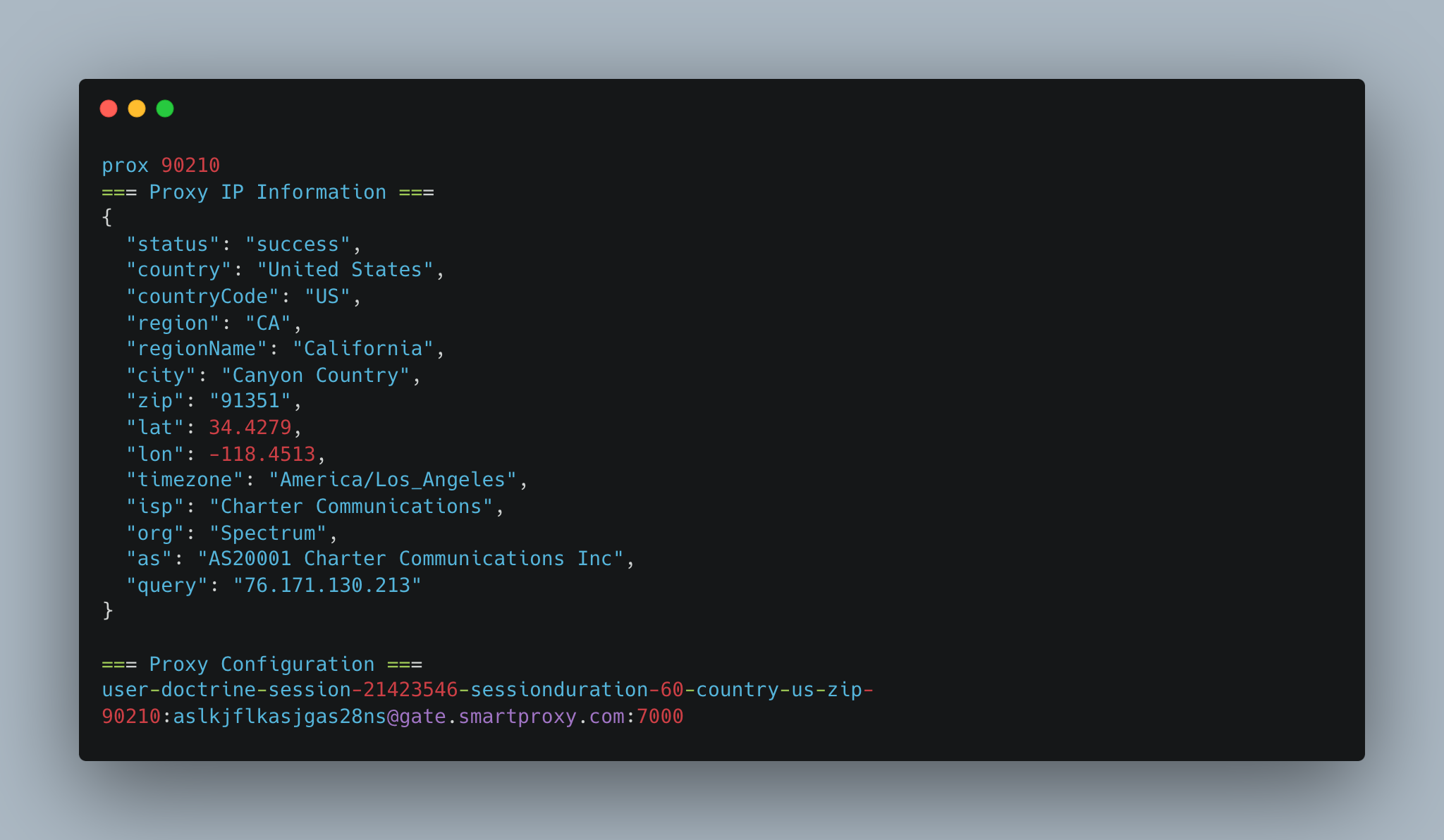
Smartproxy typically uses the following format:
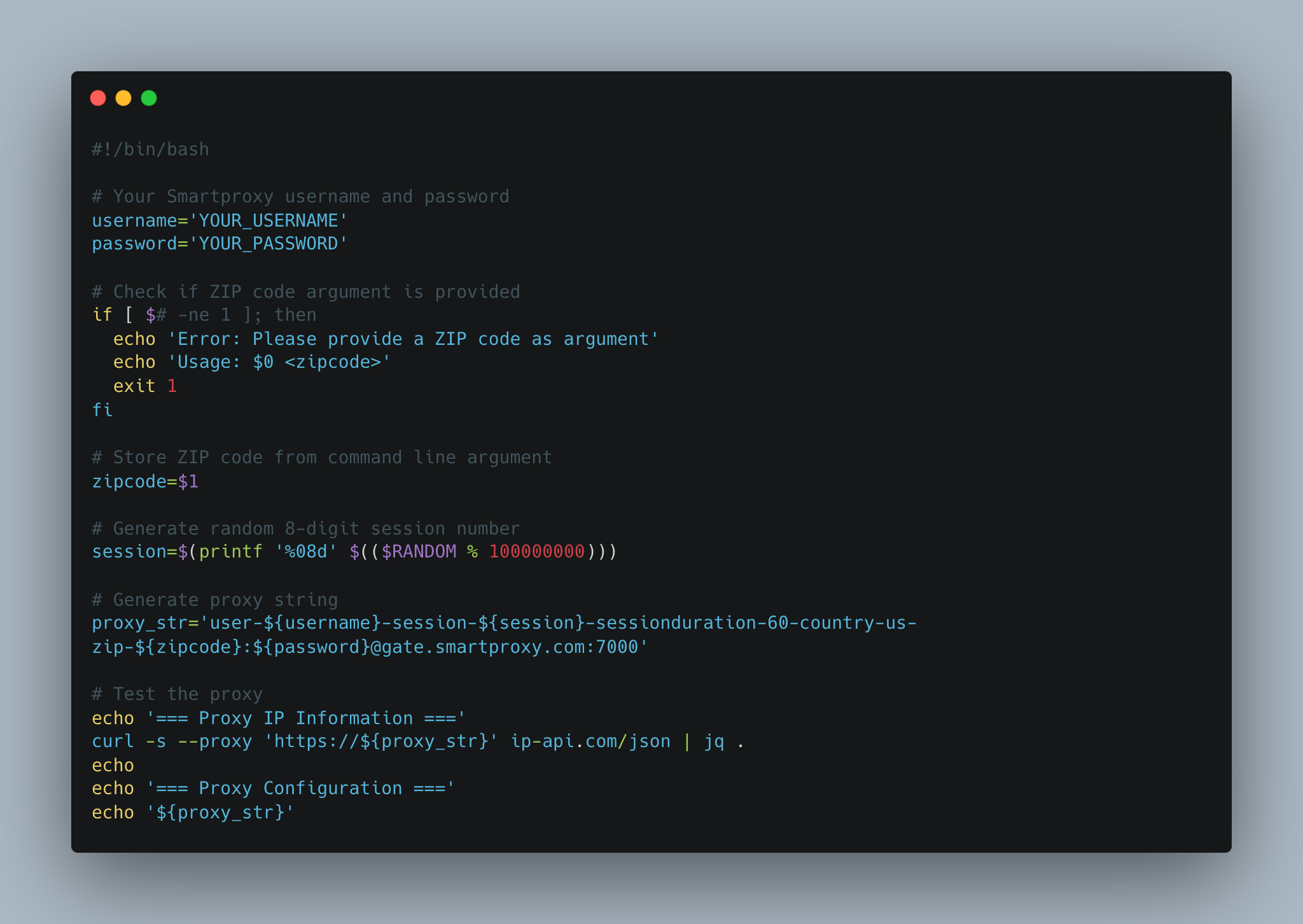
But I'm a genius, so I made a script that automates this. Here's the code:
Bash Script (Mac/Linux)
How to use (Mac):
For Windows Gang:
You can use PowerShell for a similar script:
How to use (Windows):
Important: Remember to replace `'YOUR_USERNAME'` and `'YOUR_PASSWORD'` with your actual Smartproxy credentials in both scripts. Also make sure that `curl` is installed on your Mac and that PowerShell has the necessary permissions to make web requests.
Antidetect Browsers
I've tried more antidetect browsers than I can count, but only two have proven their worth: GoLogin and Linken Sphere. Don't worry, I'll be doing a detailed analysis of every anti-detect browser I've tested soon, but for now let's focus on what actually works, especially if you're using a Mac.

These days, I work exclusively with Linken Sphere. Why? Simple — it’s the only one that works consistently well with custom DNS settings, which you absolutely need when dealing with SmartProxy’s blocked sites. Their hybrid device fingerprinting option keeps my entropy stable and allows me to blend in with the normals without raising any red flags.

Another cool feature of Linken Sphere is profile warming. Before you visit target sites, especially those with logs, you can build trust by automating common browsing patterns — searching for products, wishlisting, reading reviews. Mix up the sites you visit and let the profiles age for a few days. Fresh profiles scream scam, but profiles with an established browsing history mix well with legitimate traffic.

The results speak for themselves: my success rate has been solid, and I'm sure this scheme will be even more effective in 2025. When you're dealing with complex fraud protection systems, having a reliable fraud protection tool isn't just nice to have - it's essential.
Other Tools
Of course, my carding setup wouldn't be complete without these bad boys.
Site Analysis:

Checking device fingerprints:

IP checks:

Pro tip: Connect your IPQS API key to Linken Sphere. It will automatically monitor your IP reputation - saving you the hassle of manual checks.
VPN
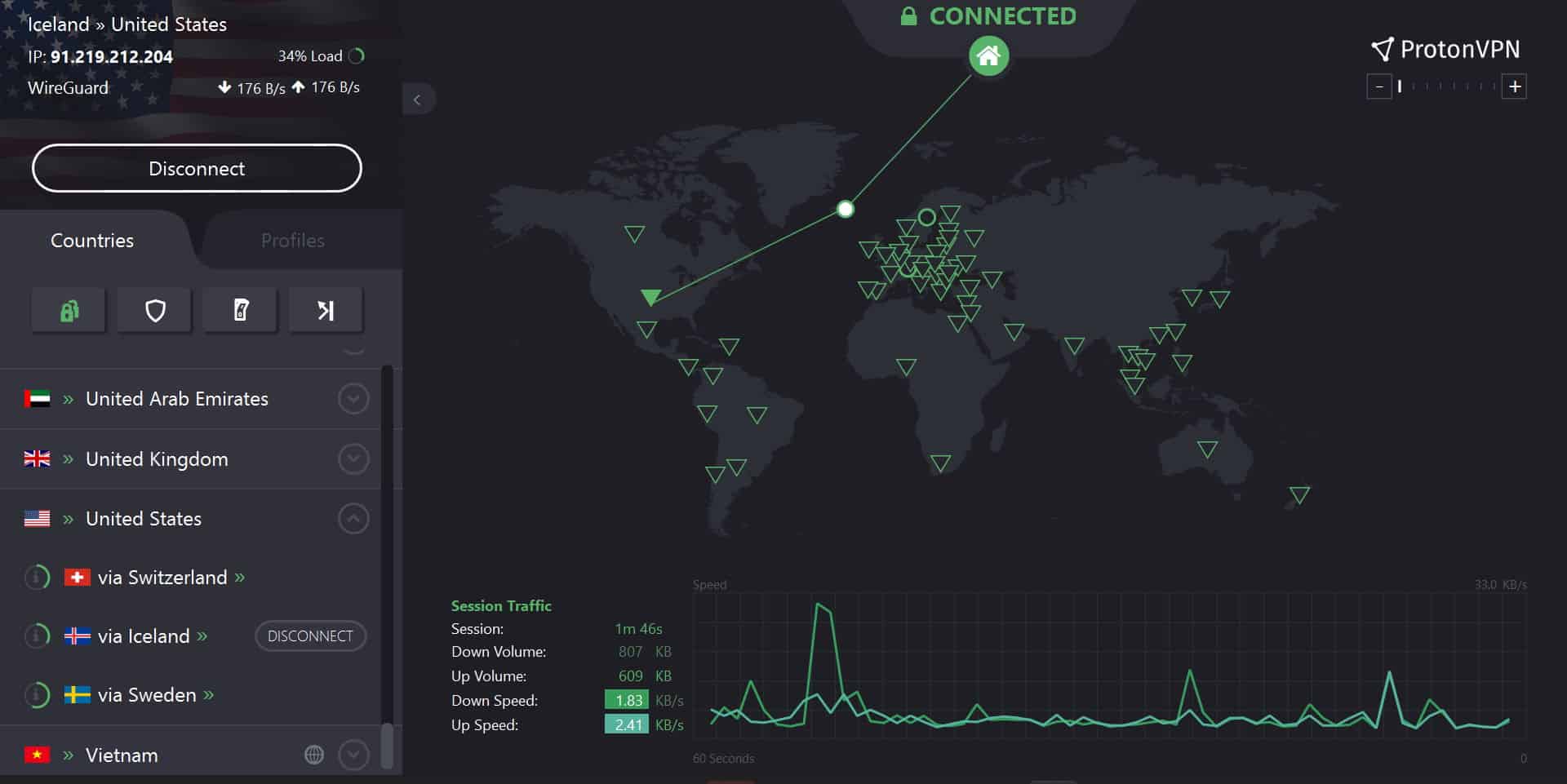
I use ProtonVPN along with everything else. Not for OPSEC, but for how it handles DNS leaks. Just map your VPN location to your proxy country. That way, even if something leaks, all traffic will look like it's coming from the same place. Clean and consistent.
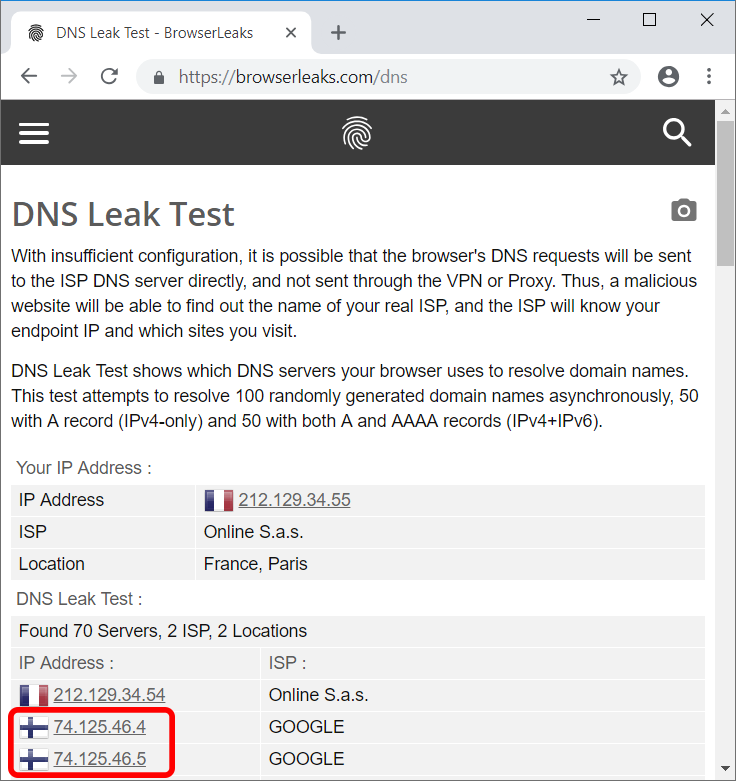
An example of an overt DNS leak if you don't map your VPN country to your proxy:
Conclusion
Here is my personal carding setup for 2025 – undetectable browsers and proxies, and tools for mixing and transacting. With the rise of AI fraud detection, merchants are stepping up their game, but that means better results for those who adapt.
This setup is just a starting point. You will find your own rhythm, maybe a different browser or a new tool. This game is about constant evolution. So expect me to update it as I change my own setup from time to time.
As always: stay ahead of the curve. Complacency will catch you. Keep your tools sharp, your OPSEC tight, and never stop learning. Every mistake is a lesson, every hit is an experience.
The digital world is a jungle, but with the right knowledge preparation and a healthy dose of paranoia, you can navigate it. In 2025, the highest results will come from those who adapt.
(c) Telegram: d0ctrine
Understanding the Carding Setup
If you’ve been paying attention to my guides, you’ll know that I’m a huge proponent of the iPhone as a carding device. I’ve gone into detail about why that’s a good topic here: iPhone: The Carder’s Ultimate Tool.
So it’s no surprise that I do 60% of all my carding with my iPhone. But telling you to just buy an iPhone would be a huge letdown, right? So for the remaining 40%, where I use my laptop, this guide will break down my setup. Most of the tools and services here are cross-platform, meaning you can use them on any OS, but for the best results and highest success rate, I recommend using Apple devices. They give you low entropy since most devices look the same, so you get a higher margin of error when carding.
Proxy Provider
I switch proxy providers like a paranoid dealer switches burner phones. There are many reasons to do this, but I have been going with SmartProxy for a long time.
Why? Because it meets my four must-have criteria:
- Large proxy pool: The larger the pool, the better. This pool is shared by all users, so the larger the pool, the less chance you have of running into another idiot using the same IP, which raises suspicion.
- Fast and reliable: I've had other proxy providers screw up right in the middle of a carding session, forcing me to change IP addresses and essentially waving a huge red flag on the transaction. SmartProxy has been reliable, keeping me in the game without these screw-ups.
- ZIP Targeting: Let's be real. ZIP codes are the bread and butter of any successful carding operation. The fact that SmartProxy allows you to focus on specific ZIP codes? That's a game changer.
- High percentage of unique IPs: It's not just about the biggest pool. For example, PIA has a huge pool, but you often get the same damn IP multiple times. SmartProxy has a solid percentage of unique IPs, which is what you need to stay undetected.
- Blocks a ton of financial sites: This is pure gold. If you've read the guide to Strategic Carding: Getting the Cleanest IPs Possible, you know that to get the cleanest proxies possible, you need providers that block financial and banking sites. Then you bypass that block. SmartProxy is a damn champion at this, blocking everything from Shopify to Stripe to banking sites.
Unique IP addresses
Okay, let's get past the "unique IP" marketing nonsense. Proxyway did a good experiment to uncover the truth about residential proxy pools. They didn't just take these providers' hyped claims at face value. They put them to the test, hammering them with hundreds of thousands of requests and cross-referencing the IP addresses with MaxMind and IP2Location.
They wanted to see how many unique IP addresses each provider actually provided, how many of them were on different C-level subnets (important to avoid getting banned), and whether they were legitimate residential addresses.
SMARTPROXY
Smartproxy came out on top, boasting 57% of unique IPs with 37% in unique class C subnets. They claim 10 million IPs, and those numbers suggest they're not exactly full of crap. Oxylabs was in second place, but the rest? Bloody shame. Luminati, the supposed king of the hill, only managed to get a measly 15% of unique IPs. RSocks and PacketStream did even worse. NetNut had a decent amount of unique IPs, but they were almost all in the same subnet. Most of the other proxy fuckers are just reselling from these larger pools, so they're more or less the same crap.
OXYLABS
NETWORK
Bottom line? Most of these providers inflate their numbers. They probably count IP addresses over weeks or months, not what is available at any given time. Smartproxy seems to be the least deceptive, but always ask these providers how they calculate their pool size before you hand over your hard-earned cash.
Smartproxy Script
Look, I'm all about efficiency. No one has time to manually configure a proxy every damn time. So to make my life easier, I whipped up a little script that I run in my terminal. I just type in the zip code I need and boom! I get a new IP.
Smartproxy typically uses the following format:
Code:
user-${username}-session-${session}-sessionduration-60-country-us-zip-${zipcode}:${password}@gate.smartproxy.com:7000But I'm a genius, so I made a script that automates this. Here's the code:
Bash Script (Mac/Linux)
Code:
#!/bin/bash

# Your Smartproxy username and password
username='YOUR_USERNAME'
password='YOUR_PASSWORD'

# Check if ZIP code argument is provided
if [ $# -ne 1 ]; then
  echo 'Error: Please provide a ZIP code as argument'
  echo 'Usage: $0 <zipcode>'
  exit 1
fi

# Store ZIP code from command line argument
zipcode=$1

# Generate random 8-digit session number
session=$(printf '%08d' $(($RANDOM % 100000000)))

# Generate proxy string
proxy_str='user-${username}-session-${session}-sessionduration-60-country-us-zip-${zipcode}:${password}@gate.smartproxy.com:7000'

# Test the proxy
echo '=== Proxy IP Information ==='
curl -s --proxy 'https://${proxy_str}' ip-api.com/json | jq .
echo
echo '=== Proxy Configuration ==='
echo '${proxy_str}'
How to use (Mac):
- Save this script as `prox.sh` somewhere on your Mac.
- Open Terminal and navigate to the folder where you saved the script.
- Make it executable: `chmod +x prox.sh`
- Run it: `bash prox.sh 90210` (replace 90210 with the desired ZIP file).
For Windows Gang:
You can use PowerShell for a similar script:
Code:
powershell:CG/scripts/prox.ps1
Your Smartproxy username and password
$username = 'YOUR_USERNAME'
$password = 'YOUR_PASSWORD'
Check if ZIP code argument is provided
if ($args.Length -ne 1) {
Write-Host 'Error: Please provide a ZIP code as argument'
Write-Host 'Usage: .\prox.ps1 <zipcode>'
exit 1
}
Store ZIP code from command line argument
$zipcode = $args[0]
Generate random 8-digit session number
$session = Get-Random -Minimum 10000000 -Maximum 99999999
Generate proxy string
$proxy_str = 'user-${username}-session-${session}-sessionduration-60-country-us-zip-${zipcode}:${password}@gate.smartproxy.com:7000'
Test the proxy
Write-Host '=== Proxy IP Information ==='
Invoke-WebRequest -Uri 'https://ip-api.com/json' -Proxy 'https://${proxy_str}' | ConvertFrom-Json | Format-List
Write-Host
Write-Host '=== Proxy Configuration ==='
Write-Host $proxy_str
How to use (Windows):
- Save this as `prox.ps1`.
- Open PowerShell as administrator.
- Navigate to the location of the scripts.
- Run it: `.\prox.ps1 10001` (replace 10001 with your ZIP file).
Important: Remember to replace `'YOUR_USERNAME'` and `'YOUR_PASSWORD'` with your actual Smartproxy credentials in both scripts. Also make sure that `curl` is installed on your Mac and that PowerShell has the necessary permissions to make web requests.
Antidetect Browsers
I've tried more antidetect browsers than I can count, but only two have proven their worth: GoLogin and Linken Sphere. Don't worry, I'll be doing a detailed analysis of every anti-detect browser I've tested soon, but for now let's focus on what actually works, especially if you're using a Mac.
These days, I work exclusively with Linken Sphere. Why? Simple — it’s the only one that works consistently well with custom DNS settings, which you absolutely need when dealing with SmartProxy’s blocked sites. Their hybrid device fingerprinting option keeps my entropy stable and allows me to blend in with the normals without raising any red flags.
Another cool feature of Linken Sphere is profile warming. Before you visit target sites, especially those with logs, you can build trust by automating common browsing patterns — searching for products, wishlisting, reading reviews. Mix up the sites you visit and let the profiles age for a few days. Fresh profiles scream scam, but profiles with an established browsing history mix well with legitimate traffic.
The results speak for themselves: my success rate has been solid, and I'm sure this scheme will be even more effective in 2025. When you're dealing with complex fraud protection systems, having a reliable fraud protection tool isn't just nice to have - it's essential.
Other Tools
Of course, my carding setup wouldn't be complete without these bad boys.
Site Analysis:
- Caido: Your best friend for website analysis. When you need to understand how a site works and how its security works.
- Burp Suite: The heavyweight champion of web testing, this beast does it all - interception, reconnaissance, you name it.
Checking device fingerprints:
- demo.fingerprint.com: Simple but effective. Shows you exactly what sites see when you visit them.
- creepjs: Gets inside your browser fingerprint. You'll be shocked at how much data you're giving away.
- fv.pro: A reliable device fingerprinting tool that analyzes your digital signature piece by piece.
- browserleaks: The complete package to see what information your browser is leaking. Trust me, it's more than you think.
IP checks:
- IPQS (IPQualityScore): Your first line of defense. If your IP is burned, IPQS will let you know before you waste time trying to hack maps.
- Scamalytics: A decent backup for IP checking. Not quite IPQS level, but still worth having in your toolbox.
Pro tip: Connect your IPQS API key to Linken Sphere. It will automatically monitor your IP reputation - saving you the hassle of manual checks.
VPN
I use ProtonVPN along with everything else. Not for OPSEC, but for how it handles DNS leaks. Just map your VPN location to your proxy country. That way, even if something leaks, all traffic will look like it's coming from the same place. Clean and consistent.
An example of an overt DNS leak if you don't map your VPN country to your proxy:
Conclusion
Here is my personal carding setup for 2025 – undetectable browsers and proxies, and tools for mixing and transacting. With the rise of AI fraud detection, merchants are stepping up their game, but that means better results for those who adapt.
This setup is just a starting point. You will find your own rhythm, maybe a different browser or a new tool. This game is about constant evolution. So expect me to update it as I change my own setup from time to time.
As always: stay ahead of the curve. Complacency will catch you. Keep your tools sharp, your OPSEC tight, and never stop learning. Every mistake is a lesson, every hit is an experience.
The digital world is a jungle, but with the right knowledge preparation and a healthy dose of paranoia, you can navigate it. In 2025, the highest results will come from those who adapt.
(c) Telegram: d0ctrine