


Why a Server Is Your New Best Friend
As a carder, your top priority is to stay under the radar and have no concrete evidence against you on your device for as long as possible. That’s where your own server comes in. It’s not just a tech toy — it’s a damn shield between you and the sites you visit.
Your own server gives you a crucial level of separation. It’s like having a scapegoat that can’t snitch. You don’t even have to run everything through a proxy.
With some basic coding skills, you can use your server to handle repetitive tasks, streamline your workflow, and keep your real identity a few steps away from your operations.
In future episodes, we’ll dive into the real meat of server operations — from automated carding to data harvesting, hacking tools, and hosting your own darknet marketplaces.
But first, let’s dig into why having a personal server isn’t just nice to have — it’s a damn necessity.
Think of your server as a digital fortress. It’s not just about separation – it’s about creating an impenetrable barrier between your real identity and your operations.
With your own server, you don’t just automate tasks – you scale your operations to a whole new level.
Run multiple carding scripts simultaneously, orchestrate massive data leaks and data distribution, host card shops and darknet markets, or manage an army of botnets – all effortlessly from your personal computer.
But here’s where things get really interesting: your server becomes a chameleon.
Need to pose as a legitimate business for a phishing campaign? Roll out a professional-looking website and host it in minutes.
Want to sell cvvs without revealing your identity? Set up a hidden service on your server.
And when the going gets tough? Poof.
Your entire operation disappears in seconds. No hrad drives to destroy, no local evidence to leave behind. Just set your server on fire and disappear into the digital ether.
Your server isn’t just a tool — it’s your ticket to the big leagues. It’s the difference between being a small-time carder and running a sophisticated, streamlined, untraceable operation.
Now let’s move on to a provider that won’t betray you the moment they see the shit you’re doing:
Choosing a Provider: OPSEC Is King
When it comes to choosing a hosting provider, forget about uptime guarantees and customer support. We’re looking for the digital equivalent of a fortress. Here’s what matters:
Here are some good options that I have personally encountered:
Remember, no provider is 100% bulletproof.
Your OPSEC practices are as important as your choice of provider.
For demonstration purposes, we will be carding a VULTR server since I am a cheapskate and don't want to spend $$$ just to show it off to you. Don't be like me lol.
Start by signing up for Vultr. Add your card and fund your account. For Vultr, make sure you don't insert prepaid cards as this will trigger a security lock that will restrict your account from adding more cards/funds.

Select the server you plan to deploy. If you plan to use the server long-term, make sure you choose a server outside the Five Eyes countries.
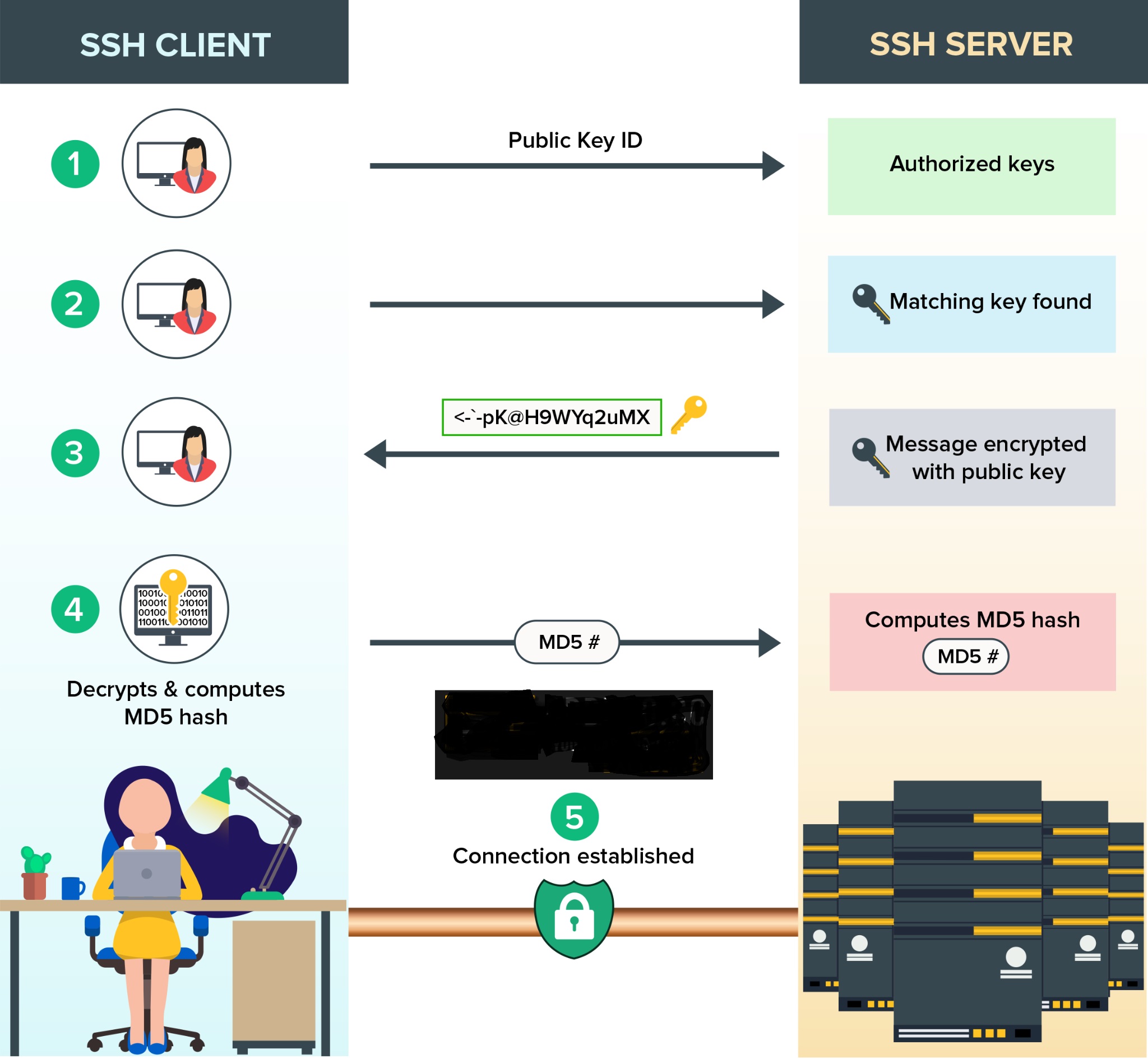
Instead of a password, we will use SSH, as it is more secure, not susceptible to brute force, and much more convenient to log in, as you will not have to constantly remember passwords.
Setting up SSH keys:
For Windows:
For Mac/Linux:
Once you have generated the key, you will receive two parts: a private key and a public key.
The public key is what you will use on any servers you spin up. This public key can only be unlocked with your private key, so make sure you keep your private key safe.
Now, adding SSH keys before spinning up servers is up to each provider. But for VULTR, we have this:

Click on the plus sign to add a new key.
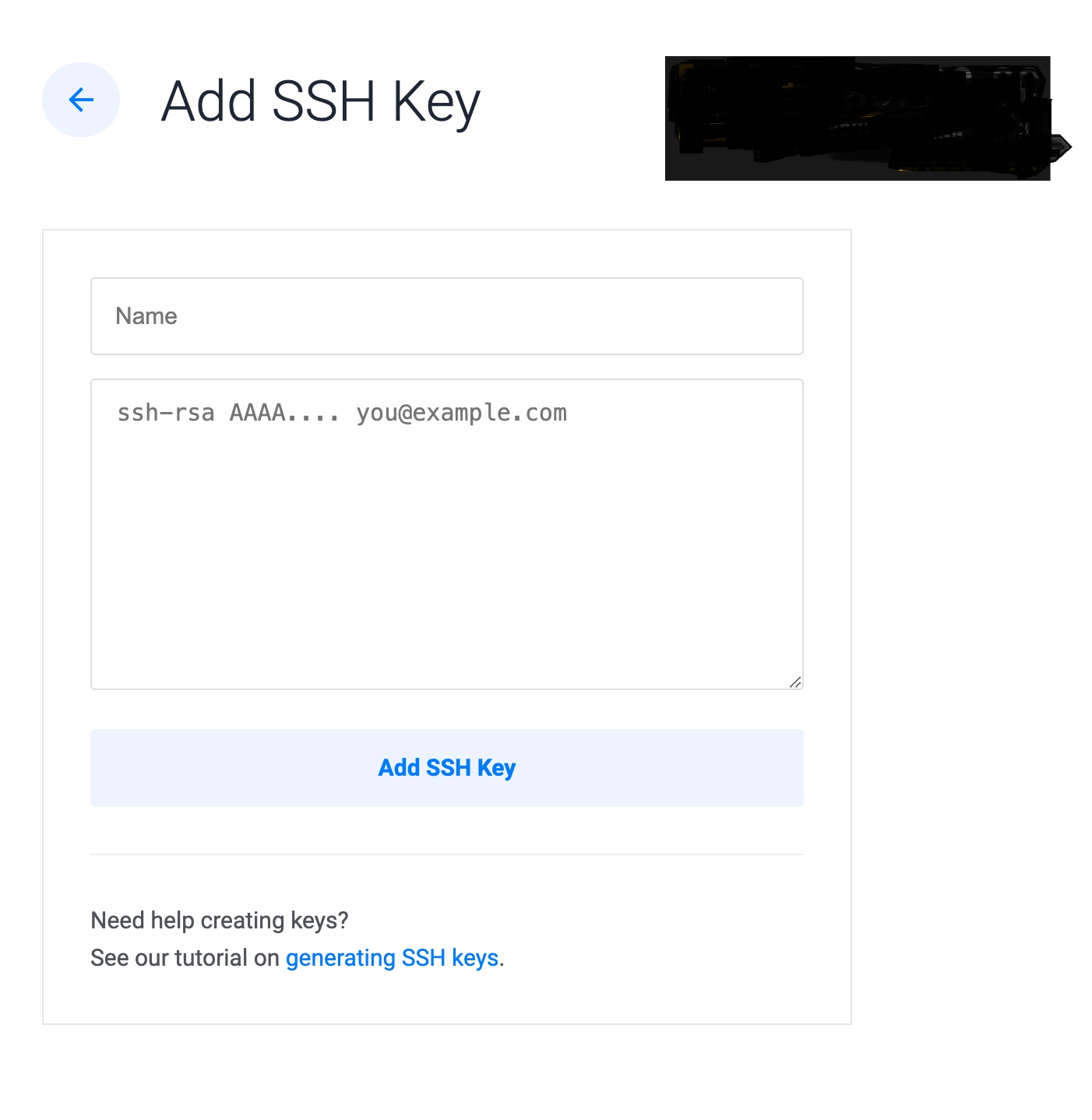
Once you are done and have successfully started the server, it will be available for access. Go back to the control panel and copy the server IP address.
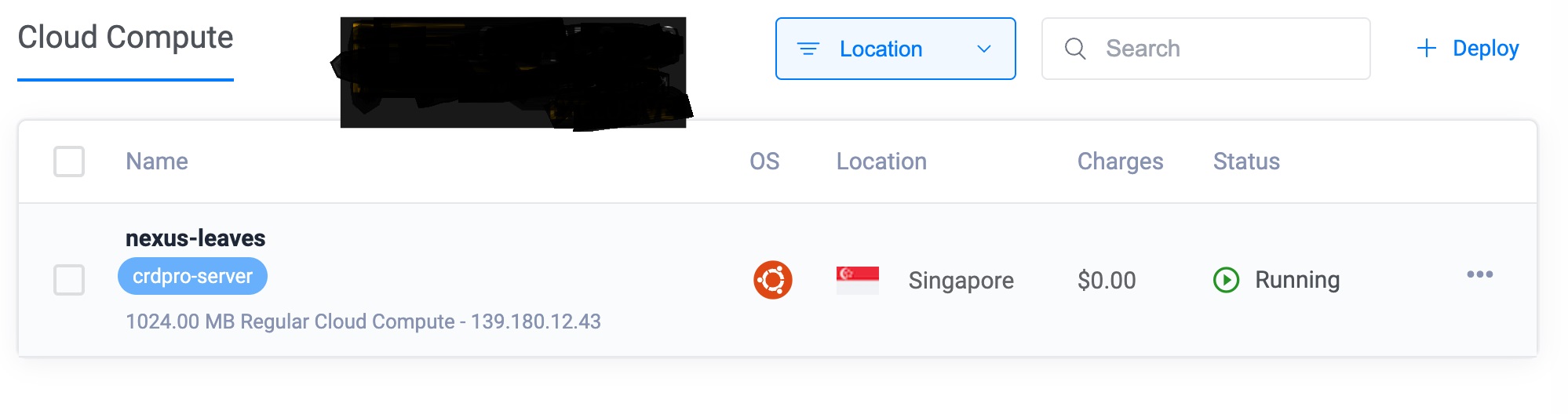
Connecting to the Server
Once you have your SSH keys set up and the server running, it’s time to connect. Use a VPN or Tor to hide your real IP address.
Windows users will need PuTTY. Enter the server’s IP address in the Host Name field. Go to the SSH settings and specify your private key file.
The first time you connect, you will receive a security warning – make sure the fingerprint matches before accepting it.
You will then need to enter your username (usually “root” for new servers) and your key’s passphrase, if you have set one.
For Mac/Linux, it’s easier. Open Terminal and enter:
Replace the path, username and IP with your real data. Verify the fingerprint when you first connect. Enter the passphrase if you have one.
Once connected, you will see the server command line. Now you are on your own secure server.
Hardening Your Server
Once you have SSH access, it is time to lock down this shit:
1. Update and upgrade:
2. Install a firewall (UFW is easy):
3. Install Fail2Ban to block password guessing attempts:
4. Disable root username and password authentication:
Edit /etc/ssh/sshd_config:
Then restart SSH: sudo systemctl restart sshd
5. Set up automatic security updates:
Now that you have your server up and running, let’s talk about the basics of OPSEC. This is
n’t just some extra crap you need to do – it’s what keeps your operation clean.
If you’re planning on doing anything truly illegal, never connect from your home IP address when SSHing into your server.
Use a VPN or TOR. This will give you another layer of protection if your hosting provider gives you away. If your provider offers full disk encryption, use it.
Remember to always be vigilant, even when you’re dealing with your own server, because once you get lazy, you lose.
Once you’ve followed all of these guidelines and properly hardened your server, you can now do whatever you want with it; and the possibilities are endless.
In my next article, I’ll show you how to run an undetectable Onion service website on your server. And in the future I will tell you more about what amazing things you can use on the server to help your carding operation.
But that's for another time. See you.
(c) Telegram: d0ctrine
As a carder, your top priority is to stay under the radar and have no concrete evidence against you on your device for as long as possible. That’s where your own server comes in. It’s not just a tech toy — it’s a damn shield between you and the sites you visit.
Your own server gives you a crucial level of separation. It’s like having a scapegoat that can’t snitch. You don’t even have to run everything through a proxy.
With some basic coding skills, you can use your server to handle repetitive tasks, streamline your workflow, and keep your real identity a few steps away from your operations.
In future episodes, we’ll dive into the real meat of server operations — from automated carding to data harvesting, hacking tools, and hosting your own darknet marketplaces.
But first, let’s dig into why having a personal server isn’t just nice to have — it’s a damn necessity.
Think of your server as a digital fortress. It’s not just about separation – it’s about creating an impenetrable barrier between your real identity and your operations.
With your own server, you don’t just automate tasks – you scale your operations to a whole new level.
Run multiple carding scripts simultaneously, orchestrate massive data leaks and data distribution, host card shops and darknet markets, or manage an army of botnets – all effortlessly from your personal computer.
But here’s where things get really interesting: your server becomes a chameleon.
Need to pose as a legitimate business for a phishing campaign? Roll out a professional-looking website and host it in minutes.
Want to sell cvvs without revealing your identity? Set up a hidden service on your server.
And when the going gets tough? Poof.
Your entire operation disappears in seconds. No hrad drives to destroy, no local evidence to leave behind. Just set your server on fire and disappear into the digital ether.
Your server isn’t just a tool — it’s your ticket to the big leagues. It’s the difference between being a small-time carder and running a sophisticated, streamlined, untraceable operation.
Now let’s move on to a provider that won’t betray you the moment they see the shit you’re doing:
Choosing a Provider: OPSEC Is King
When it comes to choosing a hosting provider, forget about uptime guarantees and customer support. We’re looking for the digital equivalent of a fortress. Here’s what matters:
- Jurisdiction: Stay away from the Five Eyes countries (US, UK, Canada, Australia, New Zealand) and their cronies.
Look for countries that tell Western law enforcement to kick rocks. Make sure they are truly "offshore". - Payment methods: Cryptocurrency is king. Only sign up with a card if you are carding the service itself, but carding these services means you will not have a server after a chargeback and they may actually sell you out since you stole from them.
If you are planning a long term operation, I do not advise you to skimp and card them. - KYC requirements: The less they want to know about you, the better. Ideally, an email address should suffice - and make it a burner.
- Registration Policy: "We don't register shit" is what you want to hear. Be skeptical of those who cooperate too eagerly with the authorities.
- Anonymous registration: Providers that allow you to register via Tor are your best bet. This shows that they understand the game and they most likely have a real market for carders and hackers.
Here are some good options that I have personally encountered:
- Njalla: Based in Sweden, accepts cryptocurrency, acts as a privacy shield between you and the VPS.
- RootLayer: Offers offshore hosting in Moldova. Accepts Bitcoin, no KYC.
- FlokiNET: Located in Iceland, Romania and Finland. Privacy-focused, accepts various cryptocurrencies.
- Shinjiru: Malaysian provider known for its "bulletproof" hosting. High anonymity, but expensive.
- Virmach: US based, but accepts crypto with minimal information requirements. Use with caution.
Remember, no provider is 100% bulletproof.
Your OPSEC practices are as important as your choice of provider.
For demonstration purposes, we will be carding a VULTR server since I am a cheapskate and don't want to spend $$$ just to show it off to you. Don't be like me lol.
Start by signing up for Vultr. Add your card and fund your account. For Vultr, make sure you don't insert prepaid cards as this will trigger a security lock that will restrict your account from adding more cards/funds.
Select the server you plan to deploy. If you plan to use the server long-term, make sure you choose a server outside the Five Eyes countries.
Instead of a password, we will use SSH, as it is more secure, not susceptible to brute force, and much more convenient to log in, as you will not have to constantly remember passwords.
Setting up SSH keys:
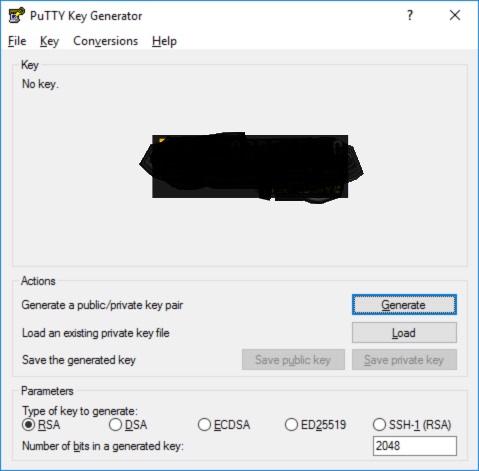
For Windows:
- Download and install PuTTY and PuTTYgen.
- Open PuTTYgen and click Generate.
- Move your mouse randomly to generate entropy.
- Save both public and private keys.
For Mac/Linux:
- Open Terminal.
- Run: ssh-keygen -t ed25519 -C "[email protected]". You can use any email address, it doesn't matter.
- Enter a strong passphrase (do not skip this step, it is very important).
Once you have generated the key, you will receive two parts: a private key and a public key.
The public key is what you will use on any servers you spin up. This public key can only be unlocked with your private key, so make sure you keep your private key safe.
Now, adding SSH keys before spinning up servers is up to each provider. But for VULTR, we have this:
Click on the plus sign to add a new key.
Once you are done and have successfully started the server, it will be available for access. Go back to the control panel and copy the server IP address.
Connecting to the Server
Once you have your SSH keys set up and the server running, it’s time to connect. Use a VPN or Tor to hide your real IP address.
Windows users will need PuTTY. Enter the server’s IP address in the Host Name field. Go to the SSH settings and specify your private key file.
The first time you connect, you will receive a security warning – make sure the fingerprint matches before accepting it.
You will then need to enter your username (usually “root” for new servers) and your key’s passphrase, if you have set one.
For Mac/Linux, it’s easier. Open Terminal and enter:
Bash:
<span>ssh</span> -i /path/to/your/private_key username@server_ipReplace the path, username and IP with your real data. Verify the fingerprint when you first connect. Enter the passphrase if you have one.
Once connected, you will see the server command line. Now you are on your own secure server.
Hardening Your Server
Once you have SSH access, it is time to lock down this shit:
1. Update and upgrade:
Bash:
sudo apt update && sudo apt upgrade -y2. Install a firewall (UFW is easy):
Bash:
sudo apt install ufw
sudo ufw default deny incoming
sudo ufw default allow outgoing
sudo ufw allow ssh
sudo ufw enable
3. Install Fail2Ban to block password guessing attempts:
Bash:
sudo apt install fail2ban
sudo systemctl enable fail2ban
sudo systemctl start fail2ban
4. Disable root username and password authentication:
Edit /etc/ssh/sshd_config:
Then restart SSH: sudo systemctl restart sshd
Bash:
PermitRootLogin no
PasswordAuthentication no
5. Set up automatic security updates:
Bash:
sudo apt install unattended-upgrades
sudo dpkg-reconfigure -plow unattended-upgrades
Now that you have your server up and running, let’s talk about the basics of OPSEC. This is
n’t just some extra crap you need to do – it’s what keeps your operation clean.
If you’re planning on doing anything truly illegal, never connect from your home IP address when SSHing into your server.
Use a VPN or TOR. This will give you another layer of protection if your hosting provider gives you away. If your provider offers full disk encryption, use it.
Remember to always be vigilant, even when you’re dealing with your own server, because once you get lazy, you lose.
Once you’ve followed all of these guidelines and properly hardened your server, you can now do whatever you want with it; and the possibilities are endless.
In my next article, I’ll show you how to run an undetectable Onion service website on your server. And in the future I will tell you more about what amazing things you can use on the server to help your carding operation.
But that's for another time. See you.
(c) Telegram: d0ctrine
